How to Improve Your Resume With AI
You already have a resume. The problem is that parts of it sound vague, repetitive, or disconnected from the job you want.
AI can help you tighten the wording and notice experience you have not explained clearly. It should not write a new career history for you.
My rule for resume help: remove your personal information, give the AI one resume section and the relevant part of one job listing, and tell it to suggest clearer wording using only the facts you provide. Reject every skill, number, result, or responsibility you cannot prove.
Do this before you paste anything
Make a copy of your resume and remove:
- your name;
- phone number and email address;
- home address;
- employee, student, or account numbers;
- reference details;
- confidential client, patient, student, or company information.
Use placeholders such as [NAME], [COMPANY], or [CITY] if the wording still needs context.
Do not assume a privacy setting makes it acceptable to share information that belongs to another person or your employer. If your workplace has an approved AI system, use that instead of a personal account.
Start with one real job
Do not ask AI to make your resume “better” in general. Open the job listing and pull out:
- the main responsibilities;
- the skills the employer actually requests;
- any software, tools, or qualifications you genuinely have;
- the part of your resume that should show that experience.
This keeps the task small and gives the AI something concrete to compare.
Copy this prompt
Act as a careful resume editor. Compare my resume bullets with the job requirements below.
Suggest clearer, shorter wording that highlights relevant experience I already have.
Do not invent skills, employers, qualifications, responsibilities, numbers, or results. Do not add a keyword unless my resume facts support it. If a useful detail is missing, write
[ADD A TRUE DETAIL]instead of guessing.For each suggestion, show:
1. the original bullet;
2. the revised bullet;
3. why the change helps;
4. anything I must verify.
Job requirements:
[paste only the relevant requirements]
My resume bullets:
[paste a redacted section]
A truthful before-and-after example
H5W tested the prompt above in signed-out ChatGPT on October 5, 2026, using a completely fictional applicant. The original bullet was:
Answered customer questions at a busy front desk.
The applicant supplies these true details:
- managed bookings in the company system;
- trained two new team members on daily procedures.
The job listing asks for customer support, scheduling, and onboarding experience.
A tested revision was:
Answered customer questions at a busy front desk and managed bookings in the company system.
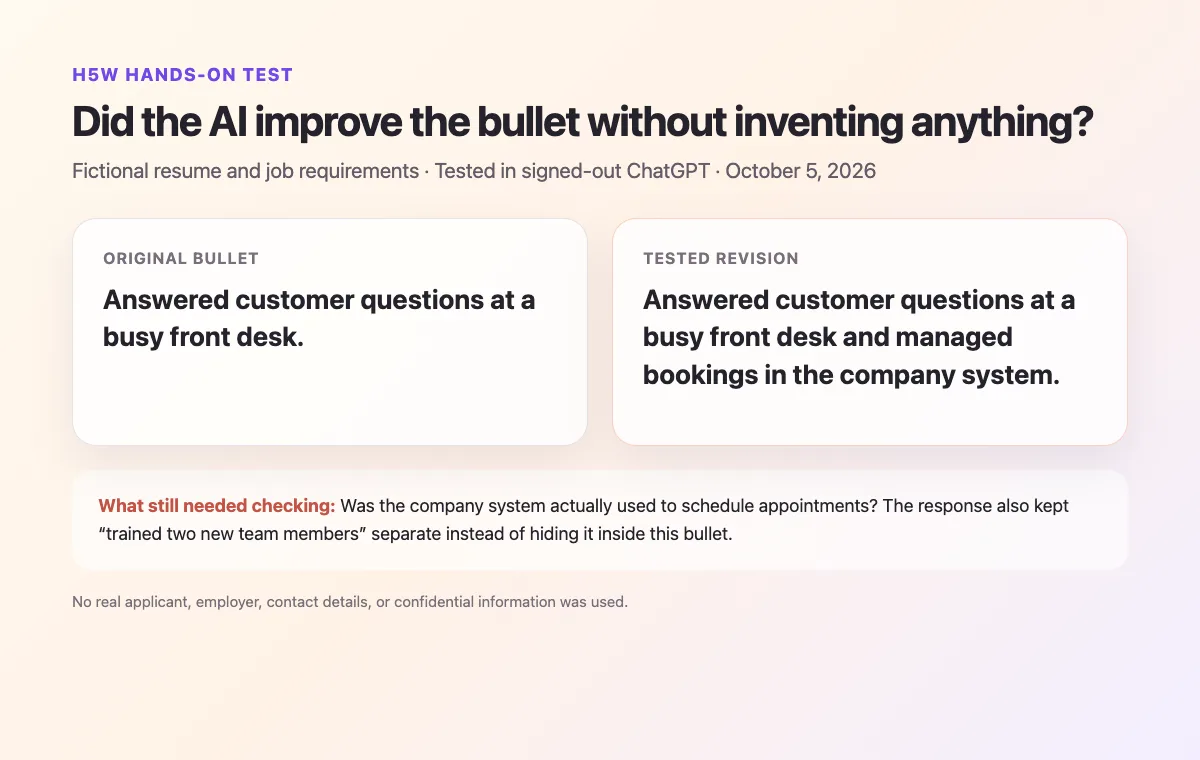
The result combined only the supplied customer-support and booking duties. It did not add a percentage, software name, customer-satisfaction score, or business result. It also warned that the applicant should verify whether the company system was actually used for scheduling before using that wording, and that training two team members belonged in a separate bullet.
If AI suggests “improved efficiency by 30%,” delete it unless you have a real source for that number.
Use AI for these jobs—not these ones
AI is useful for:
- shortening a long bullet;
- replacing vague wording with specific actions;
- comparing your existing experience with a job listing;
- finding repeated phrases or missing examples;
- checking grammar.
Do not use it to:
- invent achievements or metrics;
- claim software skills you do not have;
- change titles or dates in a misleading way;
- create a resume you cannot explain;
- promise that a document will “beat” an applicant tracking system.
The UC Davis Career Center recommends treating AI as a coach and verifying all of the content. Its guidance also says application materials should remain based on your own experience, skills, and voice.
About keywords and applicant tracking systems
Use wording from the job listing only when it accurately describes your experience. Do not paste every keyword into the resume—a keyword is not evidence that you can do the work. Keep the layout easy to read, use clear section headings, and proofread the final document.
If the AI gives you generic language
Ask a narrower follow-up:
Keep all facts unchanged. Replace generic phrases with plain, specific language. If the bullet still needs a result or example, mark the missing part with
[ADD A TRUE DETAIL].
Or ask:
Which three bullets are least relevant to this job, and which true experience from my existing resume should be easier to find?
Do not ask it to make you sound “more impressive.” That invitation often produces inflated wording.
Check every change before you use it
Before submitting the resume, ask:
- Is every employer, date, title, qualification, and skill correct?
- Can I explain every bullet in an interview?
- Did the AI add a number or result I never supplied?
- Does this still sound like me?
- Did I follow the employer's instructions about AI use?
- Did I restore the correct contact details after working from the redacted copy?
- Is the final PDF or document easy to read?
Some employers and selection processes publish their own rules for AI-assisted applications. Those instructions take priority over general advice.
The short version
Use AI as an editor, not a substitute for your experience.
Give it a redacted resume section, one real job listing, and a strict instruction not to invent anything. Accept only the changes that are true, useful, and easy for you to explain.
Next steps
- Read Is It Safe to Upload Documents to AI? before sharing a resume or job document.
- Once the resume is ready, use How to Write a Professional Email With AI for a short application or follow-up message.
When you update the matching profile, check whether an AI headshot is accurate and appropriate for LinkedIn before uploading it.
Sources and verification
Information last verified: October 5, 2026.
- UC Davis Career Center: Using AI in Your Materials
- UC Davis Career Center: Resumes
- University of Illinois Career Center: Using AI in Your Career Journey
- OpenAI: Data controls in ChatGPT
- Northern Ireland Judicial Appointments Commission: Applicant Use of AI Guidance
Free printable resource
AI Career Application Workbook
Use the practical version while you work. It is a selectable-text U.S. Letter PDF with no email gate.
Public H5W PDF with selectable text and permanent source links.
Keep going
Choose your next step
Return to Jobs for the full collection, or continue with a closely related guide.