How to Turn Meeting Notes Into a Follow-Up Email With AI
The meeting is over, your notes are rough, and people need a clear record of what happens next.
Keep decisions and action items separate: paste cleaned notes into AI, ask for a short email split into decisions, action items, and unanswered questions, and require [CHECK] wherever an owner or date is missing. Verify every commitment before you send it.
The fastest way to do it
- Remove private details the email does not need.
- Add the meeting date and purpose.
- Paste the prompt below with your notes.
- Check decisions, names, dates, and commitments against the notes.
- Edit the tone, then send the email yourself.
Do not begin with “write a polished follow-up.” A polished email can hide missing facts. First make the gaps visible.
Copy this prompt
Turn these meeting notes into a short follow-up email.
Use only facts stated in the notes. Organize the email as:
– Decisions
– Action items with owner and due date
– Questions that still need an answer
– Next meeting, if stated
Write
[CHECK]when an owner, date, or decision is missing. Do not invent commitments, deadlines, or agreement.MEETING NOTES:
[paste cleaned notes]
If the audience includes clients, add: “Keep internal discussion out of the email unless it was approved for the client.”
What happened in H5W's real test
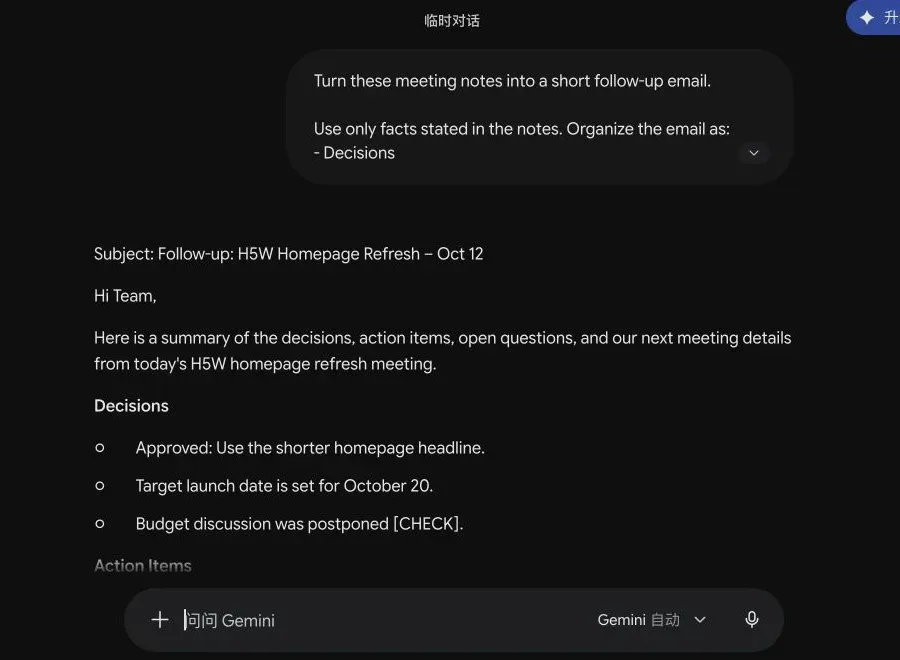
H5W tested the prompt in a logged-in Gemini Temporary Chat on October 12, 2026. The fictional notes included:
- an approved homepage decision;
- one task with a named owner and date;
- a legal-review task with no owner or deadline;
- a question with no owner or deadline;
- a budget discussion that had been postponed without a new date.
Gemini produced a readable email and kept the useful structure. It correctly named the approved headline, preserved the October 20 target and October 16 next meeting, and marked the missing legal-review owner and due date as [CHECK].
The result still needed a human pass. It described the target launch date as “set,” which sounded firmer than the source note. It also placed the postponed budget discussion under Decisions, even though the only decision was to postpone it.
Useful lesson: check not only whether a fact appears, but also how definite it sounds and where the AI placed it. A target can quietly become a commitment.
Check these four things
1. Did a suggestion become a decision?
“We could update the screenshots” is not the same as “We agreed to update the screenshots.”
2. Did AI assign work to someone?
A person mentioned in the same sentence is not automatically the owner. Keep [CHECK] when the notes do not assign the task.
3. Are the dates exact?
Replace “Friday” with the actual date when confusion is possible. Check the calendar before sending.
4. Did the email omit an unresolved issue?
The most important line may be the one that has no answer yet. Keep unanswered questions visible.
If you only have a recording, start with How to Turn a Meeting Recording Into Notes With ChatGPT.
Useful small improvements
- Ask for a subject line under 60 characters.
- Put the owner first in each action item.
- Ask for a five-line version when the meeting was simple.
- Separate “waiting on someone else” from work your team owns.
- Keep the first sentence human: thank people, acknowledge the decision, or state the purpose.
- Do not let AI send the message automatically until you have checked the recipients and attachments.
For tone and wording help, continue with How to Write a Professional Email With AI.
Privacy tip
Meeting notes can contain customer names, employee issues, legal advice, pricing, passwords, or plans that are not public. Replace names with roles when the name is not needed, and remove anything unrelated to the email.
H5W used a Gemini Temporary Chat with entirely fictional notes. Gemini's interface stated that temporary chats do not appear in recent conversations or help improve Google AI, and are kept for 72 hours for safety. That does not make confidential uploads risk-free.
The bottom line
AI is useful for turning rough notes into a readable follow-up. Its job is to organize the facts, not decide what the team agreed to. Make missing details visible, verify every owner and deadline, and send only after a human review.
Before the call, create a short meeting agenda with AI so the follow-up has a clear decision and owner to capture.
Sources and verification
Information last verified: October 12, 2026.
Hands-on test completed October 12, 2026, in Gemini Temporary Chat using fictional meeting notes. No email was sent.
Free printable resource
Professional Email Prompt Pack
Use the practical version while you work. It is a selectable-text U.S. Letter PDF with no email gate.
Public H5W PDF with selectable text and permanent source links.
Keep going
Choose your next step
Return to Write & Reply for the full collection, or continue with a closely related guide.