Best AI Voice Generators for Beginners
You have a short script for a video, presentation, course, or product demo. You need a narrator, but you do not want to pay before hearing the result—or discover after editing that the free audio cannot be used for work.
For the easiest free commercial-safe test, start with Adobe Firefly. For the most focused voice-generation workspace, choose ElevenLabs, but treat its free output as personal-use material. Use Descript when the voice-over is only one part of a video or podcast edit. Murf is useful for previewing a business-style voice, but its free plan does not let you download or use the result commercially.
If you only remember one thing, make it this: generate and download a 10-to-15-second test before recording the full script. Check the usage rights at the same time.
Quick comparison
Information last verified: October 23, 2026. Plans and allowances change, so confirm the current terms in your own account before a client or business project.
| Tool | Best for | Free option | Download and commercial use | Important limit | Beginner verdict |
|---|---|---|---|---|---|
| Adobe Firefly | A small business or creator testing one short voice-over | Free daily generations with an Adobe account; Adobe does not promise the same count for every feature and account | WAV download was available in H5W's test. Adobe describes the Firefly Speech model as commercially safe | H5W generated one 13-second clip and the account then showed 0 generations left for the day | Best first free test when you may need to use the result for work |
| ElevenLabs | Trying different voices and adjusting a dedicated narration workflow | Free plan: 10,000 credits per month, advertised as about 10 minutes; no credit card required | Download worked in H5W's test. Free output is for personal, non-commercial use and requires attribution; paid plans add commercial rights | The attractive free allowance does not include commercial use | Best dedicated voice tool for personal testing |
| Descript | Adding an AI voice inside a video or podcast edit | Free plan: 100 one-time AI credits and limited AI Speech | Free export and licensing details vary by feature; check the current terms before publishing commercial work | The AI credits are one-time, not a fresh monthly voice allowance | Best when you also need transcription and editing |
| Murf | Previewing a polished training or presentation voice | Free plan: 10 minutes of voice generation, 10 projects, one editor, and no credit card | The free plan lists no downloads and no commercial rights | You can test the workflow, but not take away a finished free file | Good preview; poor choice when you need a free deliverable |
My short version: Firefly is the practical free starting point, ElevenLabs is the better place to explore voices, Descript makes sense for an editing project, and Murf is a trial rather than a free production tool.
What H5W actually tested
I used the same fictional bakery script in logged-in ElevenLabs and Adobe Firefly accounts. No real customer's script or voice was uploaded.
ElevenLabs: the clearest dedicated voice workflow
The 221-character script produced two roughly 13-second versions with the Max “Elearning and Documentary” voice and the Eleven v4 model. The account balance fell from 7,380 to 7,159 credits, matching the 221 characters entered. A download control was available beside each result, and the player offered an MP3 output.
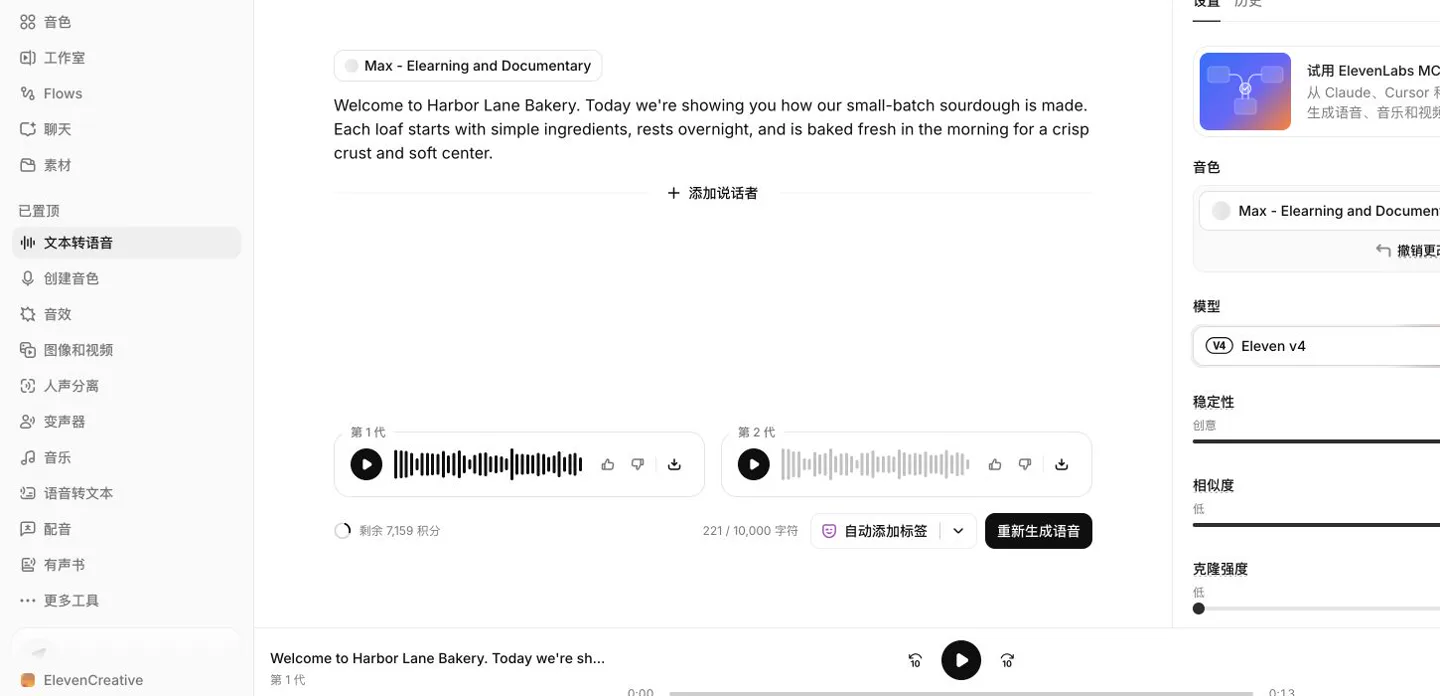
The interface gives you plenty to adjust, but do not confuse “downloadable” with “commercially usable.” ElevenLabs says free-plan output is for personal, non-commercial use and requires attribution. If the narration is for a paid course, business ad, client video, or monetized channel, check the paid-plan license first.
Adobe Firefly: easy output, surprisingly small daily room
Firefly generated the same script with its Firefly Speech model and the Brittney English (US) voice. The result was about 13 seconds long, appeared as a WAV project, and had a Download button.
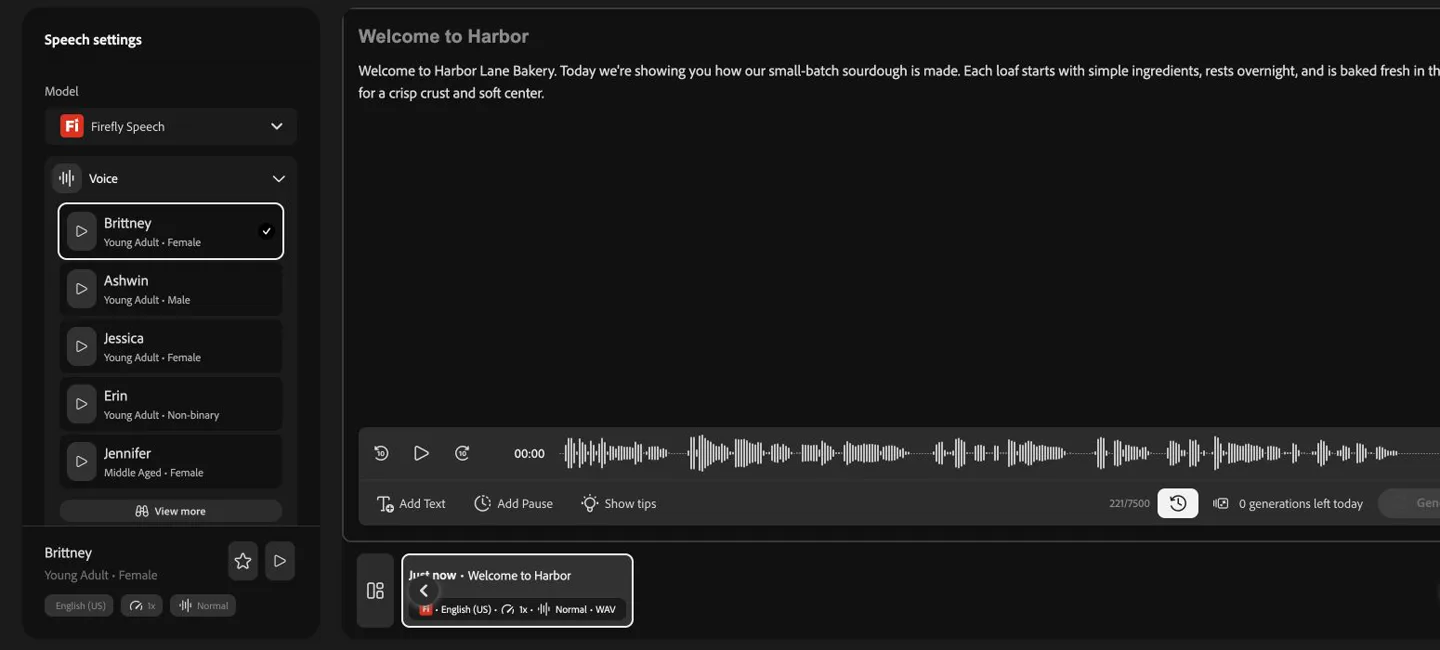
That last detail matters more than a long feature list. Firefly was the friendlier free choice for possible business use, but this account did not have enough free room for repeated auditions that day. Write and proofread the script first, then generate.
Pick by the job in front of you
You need one short voice-over for a business video
Try Adobe Firefly first. Use a finished script, choose one voice, and generate a short opening paragraph. If it sounds wrong, adjust the wording or pace before spending the next daily attempt. Confirm that the model is not labeled beta and review Adobe's current terms before publishing.
You are experimenting for a personal project
Use ElevenLabs. Its dedicated controls and monthly free allowance make it easier to compare voices. Keep the free-plan restriction in mind: a school practice project or private experiment is different from a sponsored video or client deliverable.
You are editing a podcast or video at the same time
Look at Descript. The appeal is not simply the voice generator; it is being able to revise spoken content inside the same editing workspace. The free AI credits are one-time, so it is better for deciding whether the workflow suits you than for a recurring free series.
You want a corporate training or presentation voice
Murf is worth previewing, especially if several people will eventually review the script. Just do not spend an afternoon polishing the free version and expect to download it. The current free plan explicitly withholds downloads and commercial rights.
Use this 15-second audition script
Do not test with your full project first. Use one short passage containing a name, a natural pause, and a sentence that could sound awkward.
Welcome to [BUSINESS OR PROJECT]. Today we're showing you how [PRODUCT OR PROCESS] works.
It starts with [STEP ONE], continues with [STEP TWO], and is ready for [AUDIENCE] by [TIME OR RESULT].
Replace these fields
[BUSINESS OR PROJECT]: a fictional or public name for the first test.[PRODUCT OR PROCESS]: the thing the listener needs to understand.[STEP ONE]and[STEP TWO]: short phrases, not long instructions.[AUDIENCE]: customers, students, new employees, or another clear listener.[TIME OR RESULT]: the outcome you want the final sentence to land on.
For the second test, keep the words identical and change only the voice. Otherwise you will not know whether the improvement came from the voice or from a rewritten sentence.
Listen once through phone speakers and once through headphones. Check names, numbers, abbreviations, breathless sentences, unnatural pauses, and whether the tone fits the subject. If a product name is mispronounced, spell it phonetically in a copy of the script rather than changing the original everywhere.
Five checks before you choose
- Can you download the free result? A preview inside the editor is not a finished file.
- Can you use it for work? “Free” may mean personal and non-commercial use only.
- Do the credits renew? Daily, monthly, and one-time credits support very different workflows.
- Which file do you get? WAV is useful for editing; MP3 is smaller and convenient for quick sharing.
- What happens to uploaded voices and scripts? Do not upload private client material or a real person's recording until you understand the service's settings and terms.
Safety note: a good voice can still be the wrong voice
Do not clone a person without clear permission. Avoid celebrity voices, coworkers, customers, or family members who did not agree to the use. Never use synthetic audio to make someone appear to approve a product, request money, or say something they did not say.
If a call or voice message sounds familiar but asks for urgent money or secrecy, see how to recognize an AI voice scam. If ElevenLabs is your likely choice, check the plain-English ElevenLabs guide before paying for a plan.
Sources and verification
- ElevenLabs pricing
- ElevenLabs text to speech
- ElevenLabs billing and plan documentation
- Adobe: Generate speech from text
- Adobe Firefly AI voice generator
- Adobe Firefly plans
- Murf pricing
- Descript pricing
Plan details were checked against official pages on October 23, 2026. H5W also ran the two logged-in account tests shown above. A single sample cannot prove which voice sounds best for every speaker, accent, or project, so use the same short script before making your own choice.
Keep going
Choose your next step
Return to Create Visuals for the full collection, or continue with a closely related guide.