How to Compare Products With AI Before You Buy
You have three products open in separate tabs. One page highlights battery life, another talks about comfort, and the third has a sale price that may disappear tonight. AI can put the details into one table—but it can also mix old models, stale prices, and unsupported claims.
Narrow the choice before you compare: give AI a short list of must-haves, ask it to prefer official product and support pages, and require not verified for anything the sources do not confirm. Use the comparison to narrow the choice, then check the seller's page yourself before buying.
Start with your needs, not the brands
Write five things:
- your maximum budget before tax;
- where and how you will use the product;
- three features you truly need;
- one or two deal-breakers;
- your country, because prices, models, warranties, and services differ.
Example:
Budget: no more than $220 before tax
Country: United States
Use: long novels and public-library ebooks
Must have: adjustable warm light, waterproofing, easy library borrowing
Deal-breaker: library books require an unclear or unsupported workaround
This prevents the AI from ranking products using whatever features appear most often in marketing copy.
Copy this prompt
Compare these products for the needs below.
Use current official manufacturer and official support pages first. Show the date checked and direct links.
Create a side-by-side table with:
– current listed price;
– the exact model or generation;
– each must-have feature;
– important limitations;
– warranty and return information when officially available.
Write
not verifiedwhen an official source does not support a detail. Do not use review-star averages as proof. Recommend a product only after the table, and explain which stated needs support the choice.PRODUCTS:
[list two to four products]
MY NEEDS:
[paste your budget, use, must-haves, and deal-breakers]
Keep the first comparison to two, three, or four products. A giant table with 20 options looks thorough but is much harder to verify.
What happened in H5W's test
H5W ran a real comparison in a logged-in ChatGPT Temporary Chat on October 11, 2026. We compared three US e-readers: the Kindle Paperwhite, Kobo Clara Colour, and NOOK GlowLight 4 Plus. The fictional buyer had a $220 budget and wanted easy public-library borrowing, warm light, waterproofing, and comfort for long novels.
The result created a useful table and recommended the Kobo Clara Colour because its official page showed a $179.99 US price, ComfortLight PRO, IPX8 protection, and direct library borrowing. It also marked the exact NOOK GlowLight 4 Plus library-borrowing route as unverified because the support instructions it found named older NOOK models.
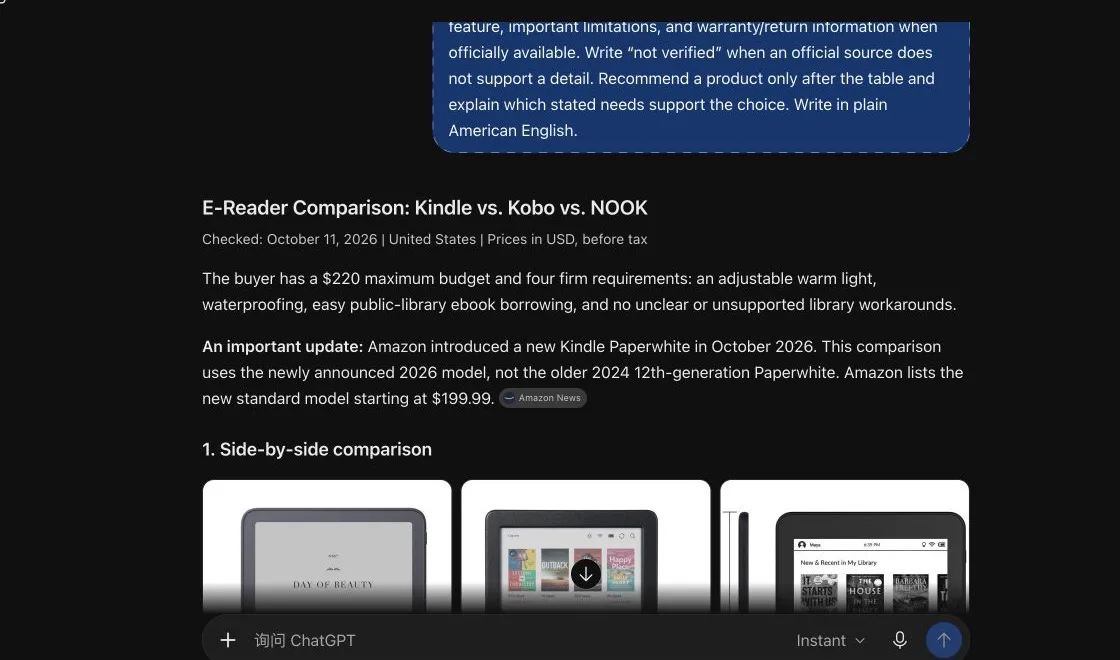
That caution was useful. The comparison also mixed current and older Kindle information: it found Amazon's new 2026 Paperwhite announcement at $199.99, while another updated Amazon buying guide still described an earlier Paperwhite at $159.99. The AI noticed the model difference, but a hurried reader could easily treat both prices as the same product.
H5W opened the official pages after the answer. The current sources confirmed the new 2026 Paperwhite announcement, Kobo's $179.99 price and listed features, the NOOK's $199.99 price and 7.8-inch/IPX7 specifications, and the US-only Kindle route in Libby. This manual check is the part you should not skip.
The five checks before you trust the table
1. Exact model and generation
“Paperwhite,” “Air,” “Pro,” and “Plus” may describe several generations. Ask for the model year, storage, and full product name.
2. Price date and seller
A sale price, member price, refurbished price, and standard price are not the same thing. Record where and when the price appeared.
3. Compatibility
Check your exact phone, computer, library, cartridge, subscription, connector, room size, or operating system. “Compatible” without context is not enough.
4. Returns and warranty
The retailer's return policy may differ from the manufacturer's warranty. Look for deadlines, opened-box rules, shipping costs, restocking fees, and exclusions.
5. The source behind every deciding claim
Open the link. A citation to a homepage or an older model does not support the current claim.
For a complete verification method, use How to Check Whether an AI Answer Is Correct.
Use AI shopping features carefully
OpenAI's Shopping Research can ask follow-up questions, search across product information, and produce a buyer's guide with tradeoffs and merchant links. ChatGPT Search can also return current web sources.
OpenAI warns that prices, stock, discounts, sizes, and colors can be wrong or out of date. Some retailers block automated access, and review summaries are generated from public information rather than independently verified by OpenAI.
That makes AI useful for shortlisting, not for the final purchase check.
A simple final checklist
Before ordering, open the actual seller page and confirm:
- final price, tax, shipping, and mandatory fees;
- exact model, generation, size, color, and storage;
- current stock and delivery date;
- every deal-breaker and compatibility requirement;
- return deadline and opened-item rules;
- warranty length, exclusions, and claim process;
- whether a subscription, account, accessory, or separate app is required.
If one unverified detail would change your decision, stop and verify it before buying.
Avoid these weak prompts
Do not ask only:
Which one is best?
“Best” may become cheapest, most popular, newest, or most highly rated.
Also avoid:
Find the product with no bad reviews.
Reviews can be incomplete, manipulated, outdated, or about a different variation. Ask what repeated tradeoffs reviewers mention, then verify the feature claims separately.
Privacy and personalization
You normally do not need to share your address, payment details, order history, income, or exact workplace to compare products. A broad budget and use case are usually enough.
Shopping Research may use ChatGPT Memory to personalize results when memory is enabled. If you do not want past preferences involved, turn memory off or use an unpersonalized Temporary Chat when the feature supports your intended workflow.
The bottom line
AI can turn scattered product pages into a useful shortlist. It cannot guarantee that a price is still live, an item is in stock, or an older support page applies to the model in your cart. Start with your own requirements, demand official sources and not verified labels, and finish on the seller's website.
If you already have two specification sheets or warranty documents, How to Compare Two Documents With AI can help you find changed terms—provided you verify every important difference against the originals.
Sources and verification
Information last verified: October 11, 2026.
- OpenAI: Using Shopping Research in ChatGPT
- OpenAI: Searching the web with ChatGPT
- Amazon: Amazon introduces a completely redesigned Kindle family
- Kobo: Kobo Clara Colour
- Barnes & Noble: NOOK GlowLight 4 Plus
- Libby: Kindle books in US libraries
Hands-on test completed October 11, 2026, using a real source-backed comparison and a fictional buyer profile. No purchase was made and no private account information was supplied.
Free printable resource
AI Answer Verification Checklist
Use the practical version while you work. It is a selectable-text U.S. Letter PDF with no email gate.
Public H5W PDF with selectable text and permanent source links.
Keep going
Choose your next step
Return to Research & Learn for the full collection, or continue with a closely related guide.