How to Check Whether an AI Answer Is Correct
The answer looks polished. It includes dates, numbers, and links. The problem is that AI can sound certain when a fact is outdated, a calculation is wrong, or a citation does not support the sentence beside it.
Start with the claims that could change your decision: identify the claims that would change your decision, open the original sources, check that each source really supports the claim, and confirm important details with another independent authoritative source.
Start with claims that could cost money, affect a deadline or grade, damage someone's reputation, or influence a high-stakes decision.
What happened in H5W's test
H5W gave a logged-in Perplexity search a fictional answer containing four planted policy errors: a fixed ChatGPT Free image quota, sign-in-free Gemini image generation, unlimited Firefly generations for every free user, and automatic indemnification for all Firefly beta outputs. H5W supplied four official help pages and asked for a claim-by-claim verdict.
Perplexity opened all four supplied pages and marked every planted statement wrong or unsupported. It correctly explained that OpenAI did not support the claimed exact quota or calendar-day reset, Gemini required sign-in, Firefly free access was limited, and permission for commercial use was not the same as legal indemnification.
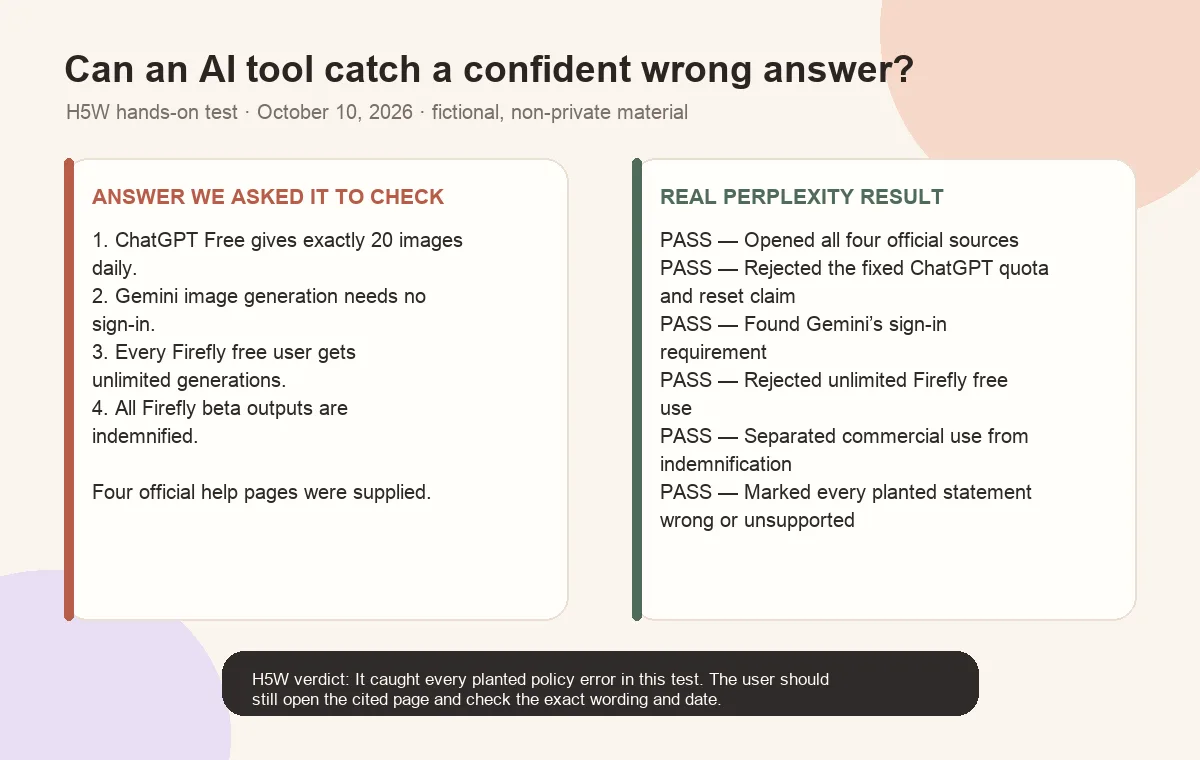
This controlled test worked because the sources were official and supplied in advance. “The AI provided links” is still not the finish line. Open the pages yourself and check that the quoted rule, plan, country, and update date match your situation.
The five-minute check
1. Turn the answer into claims
Underline or copy the facts that can be checked:
- dates and deadlines;
- prices, percentages, and totals;
- names, titles, and quotations;
- product features and limits;
- laws, policies, rules, and requirements;
- study results or statistics;
- cause-and-effect statements.
If the answer is long, use this prompt:
Turn your previous answer into a checklist of factual claims. For each claim, show the exact source link you relied on, the publication or update date, and the sentence or section that supports it. Mark anything you cannot support as unverified.
This makes the work easier. It does not prove the claims are true.
2. Open the sources
A citation is only a lead. Check:
- Does the page exist?
- Is it the original source or a summary of someone else's work?
- Does it say what the AI claimed?
- Is the information current enough for the question?
- Does the source cover the same country, product plan, age group, or situation?
Watch for a source that mentions the topic but does not support the exact number or conclusion.
3. Read sideways
Do not stay on one convincing-looking page. Open another tab and check who published it, what other reliable sources say, and whether the claim appears in an official document or original study.
Stanford researchers found that professional fact-checkers were faster and more accurate than other skilled readers because they used this “lateral reading” approach instead of judging a site mainly by how professional it looked.
4. Check dates and numbers yourself
For a calculation, copy the inputs and redo the math with a calculator or spreadsheet. For a price or limit, go to the current official product page. For a policy, open the actual policy rather than a blog summarizing it.
When two sources disagree, note their dates and definitions. They may be measuring different things.
5. Decide what is safe to use
Label each important claim:
- Verified: the original source clearly supports it.
- Probably correct: more than one reliable source agrees, but the original evidence is unavailable.
- Unclear: the wording, date, or scope does not match.
- Wrong or unsupported: the source contradicts it or does not contain it.
Remove or rewrite unclear claims instead of making them sound certain.
Common warning signs
Pause when an AI answer contains:
- a quotation with no page or transcript;
- a study with no author, journal, or working link;
- a precise percentage with no explanation of what was measured;
- a current price without a date or official plan page;
- “experts say” without naming the experts;
- a source that links to a homepage instead of the supporting page;
- several citations that all repeat the same original claim;
- confident advice in a high-stakes area without clear limitations.
OpenAI says ChatGPT may produce incorrect definitions, dates, facts, quotations, studies, and citations. A linked source can still be weak, outdated, or misunderstood.
A source-backed answer can still be wrong
Imagine an AI says, “The free plan allows 20 uses every day,” and links to a help center.
The link may be real, but you still need to check:
- whether the page is for the same tool and plan;
- whether “20 uses” refers to messages, images, uploads, or something else;
- whether the limit is daily, rolling, or described as variable;
- when the page was updated;
- whether availability differs by country or account.
One missing detail can change the answer.
When to stop and ask a person
Do not use an AI answer as the final authority for a medical diagnosis, legal right, tax filing, credit decision, employment action, safety procedure, or large financial commitment.
Use AI to prepare questions and understand plain language. Then check the current official source and, when needed, a qualified professional who is responsible for the decision.
The bottom line
Do not ask the same AI, “Are you sure?” and treat its second answer as verification. Pull out the important claims, open the evidence, compare independent sources, and check numbers and dates yourself.
If you prefer an AI search tool that displays source links, see the H5W Perplexity guide. The links make verification quicker; they do not remove the need to open them.
If you are checking whether two uploaded files say the same thing, use How to Compare Two Documents With AI and verify every changed date, number, and condition against the originals.
If your own writing was flagged as machine-written, see what an AI-detector score can and cannot prove and which writing-process evidence to save before requesting a human review.
Election dates, voter ID, registration status, and polling places need a stricter source path. Use H5W’s election-information verification checklist before acting on a chatbot answer.
Sources and verification
Information last verified: October 10, 2026.
- OpenAI: Does ChatGPT tell the truth?
- Stanford Report: Fact checkers outperform historians when evaluating online information
- Stanford Graduate School of Education: Changing the history course
- Perplexity: What is Pro Search?
- Google Search Help: Learn search tips and how results relate to your search
Hands-on test completed October 10, 2026, using deliberately planted policy errors and official public sources.
Free printable resource
AI Answer Verification Checklist
Use the practical version while you work. It is a selectable-text U.S. Letter PDF with no email gate.
Public H5W PDF with selectable text and permanent source links.
Keep going
Choose your next step
Return to Research & Learn for the full collection, or continue with a closely related guide.