
Can You Trust AI for Election Information?
An AI answer tells you the voter-registration deadline, which ID to bring, or where to vote. It sounds certain and may even include links.
Use it as a starting point, not as the final authority. Before you register, travel to a polling place, request a ballot, or decide that you missed a deadline, confirm the answer on your current state or local election website.
AI is useful for explaining unfamiliar terms and turning a broad question into a checklist. It cannot see your private voter record, and it may mix rules from different places or elections.
Check these details before you act
| Your question | Source that can confirm it |
|---|---|
| Am I registered at my current address? | Your state's official voter portal or local election office |
| Where is my Election Day polling place? | The official lookup for your state or county |
| What is the registration or mail-ballot deadline? | The current election calendar from your state or local election office |
| Which ID can I use? | Your state's current voter-ID page |
| Is a viral claim about voting rules true? | The election office responsible for that rule, plus independent reliable reporting when the claim concerns a wider event |
Do not enter your driver's-license number, Social Security number, date of birth, full home address, or voter-registration details into a chatbot. Use the official portal for personal lookups.
A four-step way to check an AI answer
1. Name the exact place and election
Election rules are local and date-specific. Write down the state or territory, city or county, election date, and whether the question concerns registration, early voting, Election Day, or voting by mail. An answer about “voting in Virginia” may still be incomplete when the real question is about an Arlington polling place.
2. Ask for official sources, then open them
A source link is a lead, not proof. Open it and check:
- Is it a current government election page?
- Does it cover your state or county?
- Does it name the same election date?
- Does it describe the same voting method?
- Does the page show the current election year?
For U.S. voters, Vote.gov routes registration questions to state websites. The U.S. Election Assistance Commission says the best source for practical voting rules is the state or local election office.
3. Separate public rules from your personal status
AI may correctly explain a state's general rule. It still cannot confirm that your registration is active, that your address was updated, that your mail ballot arrived, or that a particular building is your assigned polling place.
Use the official portal for those checks. If the record is missing or confusing, contact the election office through details published on its own website.
4. Do not let a polished answer end the check
Tables, citations, and confident wording can make an answer feel official. Open the cited page and make sure it supports the exact rule and election year.
OpenAI's own help center says ChatGPT can produce incorrect facts, dates, quotations, studies, and citations, and recommends checking important information against reliable sources.
What happened in H5W's test
On October 31, 2026, H5W asked ChatGPT about a fictional voter who had moved to Arlington, Virginia. We requested the November 3, 2026 registration deadline, in-person voter ID rules, and the official polling-place lookup. The prompt required current government sources, a confirmed/unverified split, and no guessing.
ChatGPT correctly reported Virginia's October 23 regular registration deadline, same-day registration after that date, voter-ID options, and the Virginia and Arlington polling-place routes. H5W checked each point against the state and county election pages.
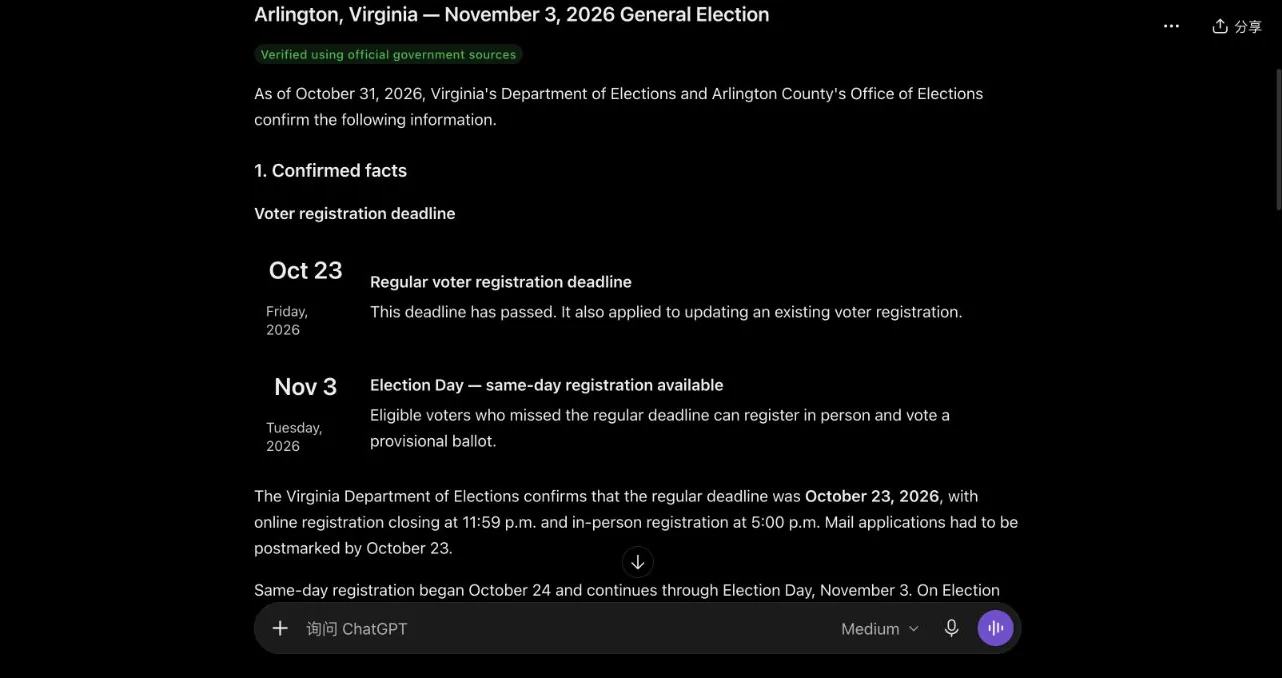
It also marked the fictional voter's registration status, exact precinct, and personal ID situation as unverified. That is the right boundary.
It was not perfect. A third-party resource card still appeared even though the prompt asked for government sources only. The core claims matched, but H5W did not treat the AI interface or that card as proof. A careful prompt improved the answer; the final check still happened on official websites.
Copy this prompt
I need current election information for [STATE OR TERRITORY], [CITY OR COUNTY], for the election on [ELECTION DATE].

My question is: [QUESTION]

Use current official government election sources only. Link directly to the state or local election page that supports each answer. Separate confirmed public rules from anything you cannot verify about my personal voter record. Do not guess, do not infer my polling place, and do not use an old election page as if it were current.

End with a short verification checklist showing the jurisdiction, election date, official source, and any detail I must confirm in the official voter portal or with the election office.
Replace these fields: [STATE OR TERRITORY] is where you are registered; [CITY OR COUNTY] is your local election jurisdiction; [ELECTION DATE] includes the year; [QUESTION] is one specific task, such as checking the registration deadline or acceptable voter ID.
Do not paste your full address or identification numbers into the prompt. Enter them only in the official voter portal when required.
Warning signs that the answer is not ready to use
Pause if the AI answer:
- gives one national rule for a question controlled by states or counties;
- leaves out the election year;
- names a polling place without using your official voter record;
- says your registration is active without access to the state portal;
- links to a blog, campaign, social post, or search snippet instead of the election office;
- tells you a deadline has passed without showing the current official calendar;
- cannot explain which part remains uncertain.
The rule to remember
AI can help you form the question. Your election office confirms the answer.
If you already acted on an AI answer, recheck your registration, deadline, and polling place on the official site now. Contact the local office if the record does not match.
For a reusable method to inspect citations, dates, and unsupported claims, follow How to Check Whether an AI Answer Is Correct. If the claim arrives as a realistic clip, use How to Tell If a Video Is AI-Generated and verify the event itself through official sources.
Sources and verification
Information last verified: October 31, 2026.
- U.S. Election Assistance Commission: Artificial Intelligence and Election Administration
- U.S. Election Assistance Commission: Voter FAQs
- Vote.gov: Register to vote
- OpenAI: Does ChatGPT tell the truth?
- Virginia Department of Elections: Voter identification
- Arlington County: November 3, 2026 election information
- Arlington County: Polling places
H5W completed a real ChatGPT test with a fictional voter scenario and checked the action-changing claims against the linked Virginia and Arlington government pages. The test did not access a voter record or submit personal information.
Keep going
Choose your next step
Return to Safety & Privacy for the full collection, or continue with a closely related guide.