
How to Tell If a Video Is AI-Generated
A short video lands in your messages. It appears to show a real person saying something shocking, or a dramatic event no one else seems to be reporting.
Do not try to decide from the face alone. Check the original post, look for an AI label or Content Credentials, search key frames, and confirm the claim through another reliable source. A watermark check can prove that some supported AI tools were used, but a negative result does not prove the video is real.
If the clip is asking you to send money, share a code, believe an emergency, or damage someone's reputation, pause before forwarding it.
The five-minute check
1. Read the label and description
Start where the video was posted. YouTube now places its main label for realistic AI-generated or meaningfully altered videos near the player, and Shorts may show it as an overlay. Other platforms use different wording.
A label is useful evidence. No label is not proof that a video is authentic: the creator may not have disclosed it, the platform may not have detected it, or the file may have been reposted elsewhere.
2. Find the earliest source you can
Open the account that first posted the clip, not a screenshot or repost. Look for a full-length version, a named creator, a date, a location, or links to supporting material.
Then search the event in plain words. If the video supposedly shows a public announcement, disaster, arrest, product launch, or celebrity statement, look for the same event on the official site and in independent reporting.
A real video can still be cropped, given a false caption, or paired with replacement audio. Verify the claim, not only the pixels.
3. Search a few key frames
Pause at two or three clear moments and take screenshots. Choose a face, building, sign, product, or distinctive background rather than a blurry transition.
Run those frames through Google Lens or another reverse-image search. An older upload may reveal that the footage is real but unrelated to the new caption. Matching frames can also lead you to a longer original that shows what happened before or after the viral clip.
4. Check for a watermark or Content Credentials
Google's current verification tools can check a video for SynthID and compatible Content Credentials. SynthID is an invisible watermark used by Google AI tools and participating partners. Content Credentials can describe a file's origin and editing history when the file contains a compatible signed record.
In Gemini, upload one file and ask whether it was generated or edited by AI. Google currently accepts a single image, video, or audio file up to 100 MB for verification. Its help page also lists daily quotas and explains that availability may vary.
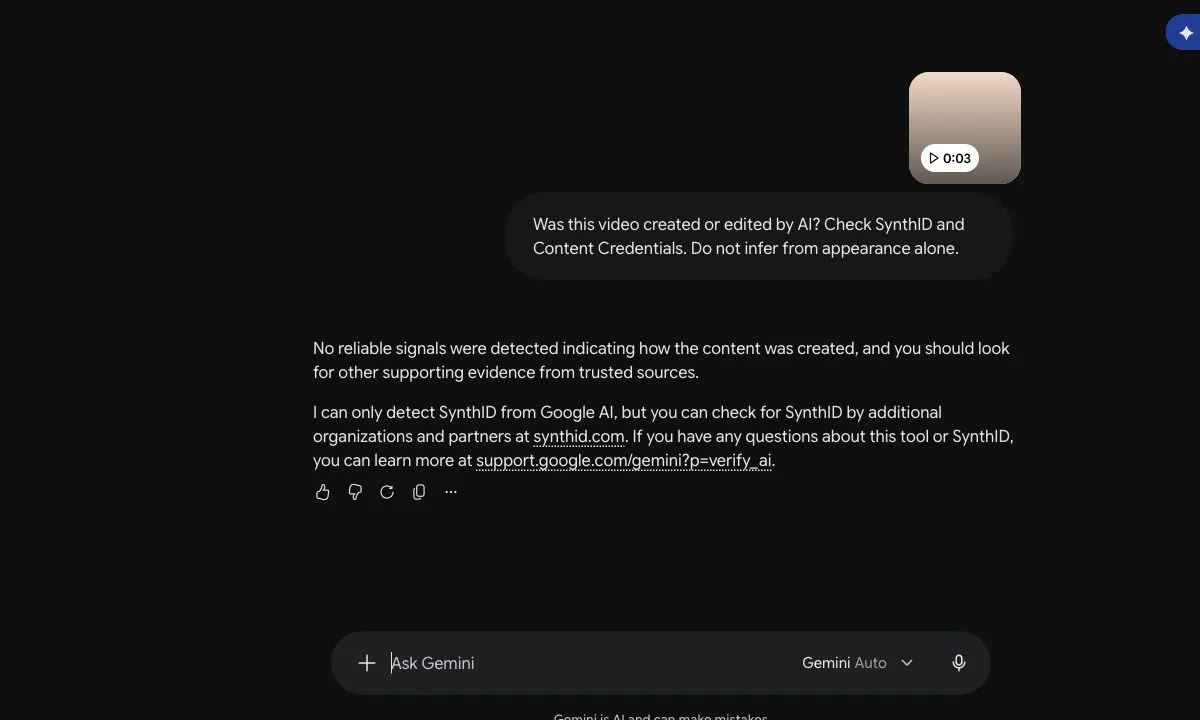
Gemini reported that it found no reliable signal showing how the clip was created and told us to look for supporting evidence from trusted sources. That result was appropriate for this test: H5W made the clip locally without a supported AI-video generator or provenance record. It also demonstrates the main limitation—a “not detected” result is not the same as proof that a video is authentic.
Read the result carefully:
- SynthID detected means all or part of the checked file contains a supported watermark.
- No SynthID detected means Google did not find that watermark. The video could still come from another AI system.
- Content Credentials found may show how the media was made or edited.
- No credentials found does not prove the file came straight from a camera.
Compression, repeated editing, screen recording, and platform processing can remove or weaken provenance signals.
5. Inspect motion and sound—but treat them as clues
Watch at normal speed, then slow the suspicious moment. Look for objects changing shape between frames, reflections that do not follow movement, text that mutates, inconsistent shadows, a mouth that does not match the speech, or a voice that loses natural breathing and room sound.
These are reasons to investigate, not a verdict. Video compression, stabilization, frame interpolation, dubbing, poor lighting, and ordinary editing can create similar effects. Modern generated video may show none of the old obvious mistakes.
What a detector cannot tell you
A detector result is a supporting signal, not a truth machine. It may recognize media from particular generators and miss unfamiliar ones. It may also be less reliable after the video has been cropped, compressed, or recorded from another screen.
Do not upload private family footage, intimate material, medical recordings, workplace video, or an identity document to an unknown detector. Check the service's privacy terms first.
For a high-stakes claim, use several kinds of evidence: the source, the history of the clip, provenance information, other reporting, and direct confirmation from the person or organization involved.
If you still cannot tell
“I could not verify this video” is a useful answer.
- Do not repost it with a confident caption.
- Do not send money or reveal a password or one-time code.
- Save the original link, account name, and time.
- Contact the named person or organization through a number or website you already trust.
- Report impersonation, fraud, harassment, or non-consensual intimate content through the platform's reporting path.
If the suspicious evidence is a still picture, use How to Tell If an Image Is AI-Generated. If a familiar voice is asking for urgent money, follow the independent call-back steps in AI Voice Scams: How to Spot and Avoid Voice Cloning Fraud.
If a clip makes a claim about voting rules, deadlines, or polling places, follow H5W’s election-information source check and confirm it with the responsible state or local election office.
Sources and verification
Information last verified: October 20, 2026.
- Google: Verify AI-generated images, videos and audio
- Google DeepMind: Google expands SynthID Detector
- YouTube: Improving AI labels for viewers and creators
- Ofcom: Deepfake Defences 2 — The Attribution Toolkit
Keep going
Choose your next step
Return to Safety & Privacy for the full collection, or continue with a closely related guide.