
How to Summarize a Long Email Thread With AI
You open an email chain and see the same quoted messages repeated again and again. Somewhere inside it, a deadline changed, two people agreed on a decision, and someone is waiting for your reply.
Make a clean copy of the thread, keep the messages in time order, and ask AI for five things: a short summary, decisions, action items, deadlines, and unanswered questions. Tell it to write “not stated” instead of guessing an owner or date.
Clean the thread first
Do not paste the entire inbox page. Copy only the messages that belong to this subject.
Remove:
- signatures and legal footers;
- email addresses, phone numbers, and account details;
- unrelated quoted messages;
- tracking links and attachment notices;
- confidential customer, employee, school, or company information;
- repeated copies of the same earlier message.
Keep the sender label, date, and message text when they matter. Replace real names with labels such as [CLIENT], [MANAGER], and [ME].
Put the oldest message first. That makes changes easier to follow.
Copy this prompt
Summarize the email thread below for someone who needs to act on it.
Use only information stated in the messages. Do not guess missing dates, owners, decisions, or reasons.
Give me:
1. a five-sentence summary;
2. decisions that were actually made;
3. an action table with task, owner, deadline, and supporting message date;
4. deadlines or dates that changed;
5. questions that are still unanswered.
If an owner or deadline is missing, write “not stated.” If two messages conflict, show both versions and identify the later message.
EMAIL THREAD:
[paste the cleaned messages from oldest to newest]
This prompt is intentionally strict. A smooth summary is less useful than an honest one that shows what is missing.
What happened in H5W's test
H5W tested the method in a logged-in ChatGPT temporary chat on October 10, 2026, using a fictional six-message thread. The thread included an early Friday launch proposal, a final Monday launch decision, a price change from $85 to $79, two named owners, unresolved parking questions, and an invoice review with no owner.
The output passed the factual checks. It kept Monday, October 19 at 9:00 AM as the final launch time, kept $79 as the final price, assigned the FAQ to Alex and the registration email to Jordan, and wrote “not stated” for the unassigned invoice work. It also separated the earlier proposal from the later decision and preserved both parking questions.
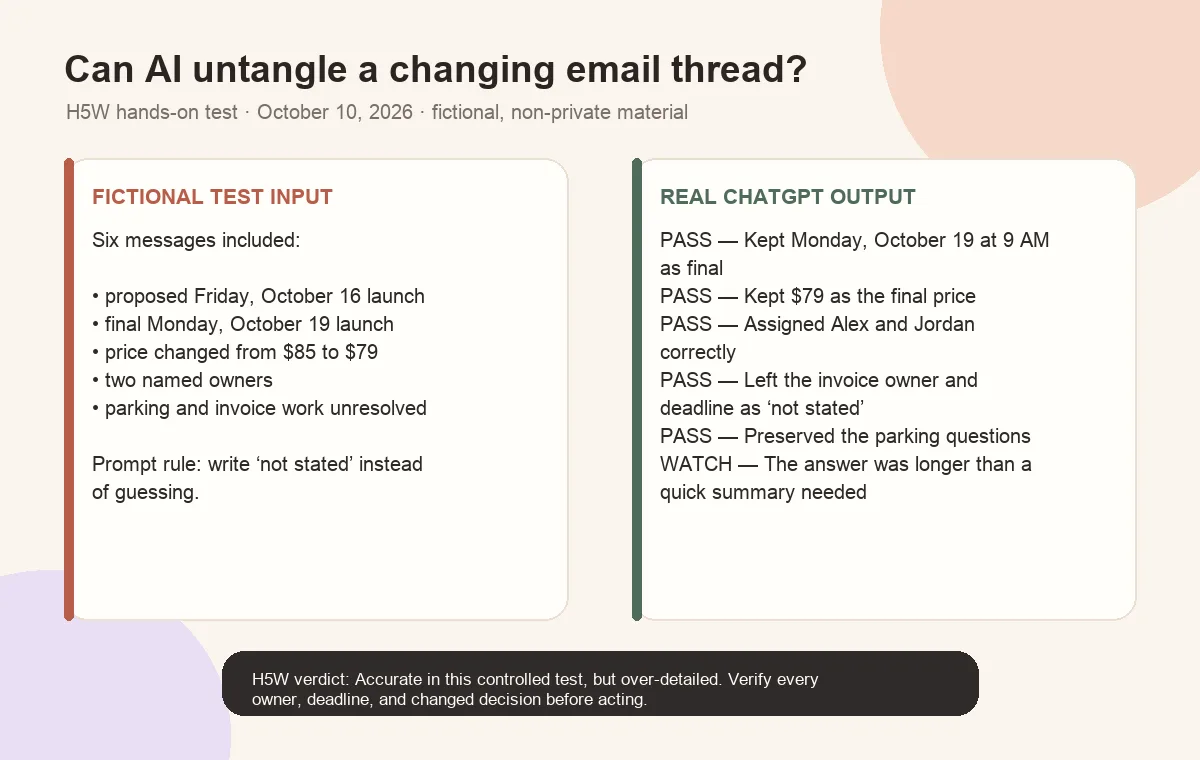
The weak point was length. ChatGPT produced several tables, extra follow-up questions, and an additional Chinese recap on this account. The facts were useful, but a busy reader would probably ask for a shorter version next.
That does not mean every email summary will be right. This test was small and carefully structured. With a real work thread, still compare every decision, owner, changed date, and open question with the original messages.
Check these four things
1. Was a suggestion mistaken for a decision?
“We could launch Friday” is not the same as “We agreed to launch Friday.” Open the original message before treating an idea as final.
2. Did the deadline change?
AI may notice both dates but put the old one in the action table. Check the newest clear instruction and keep the earlier date only as history.
3. Is the owner actually named?
Do not let the AI assign a task to the person who mentioned it. If the thread says, “Someone needs to check the invoice,” the owner is still not stated.
4. Did the summary drop an open question?
Unanswered questions often matter more than the background discussion. Compare the AI's list with the last two messages in the thread.
Ask for a reply only after the summary is correct
Once you have checked the facts, use a second prompt:
Draft a short reply based only on the verified summary below. Confirm the decisions, list what I will do, and ask the unanswered questions. Do not add a promise or deadline that is not in the summary.
Then edit the reply in your own voice and run the final checks in H5W's guide to writing a professional email with AI.
If the thread is too long
Split it into meaningful parts:
Good divisions include:
- one week at a time;
- before and after a decision meeting;
- one subject or problem at a time;
- the original discussion and the later follow-up.
Ask for the same five-part summary for each section. Verify each one before asking AI to combine them and show conflicts or changed decisions.
Protect private work information
A personal AI account may not be approved for customer messages, employee discussions, legal notices, pricing, or unreleased plans. Turning off model training does not give you permission to share someone else's information or automatically delete saved chats.
For employer, school, or client email, use an approved system. If you cannot safely clean the messages, summarize them inside the original email system.
Use H5W's checklist for information you should never share with AI before pasting a real thread.
The bottom line
AI can turn a long thread into a useful working brief, but it should not decide what people agreed to. Clean the messages, request a fixed output, and check decisions, changed dates, owners, and open questions against the original emails.
Sources and verification
Information last verified: October 10, 2026.
- OpenAI: Data controls in ChatGPT
- Google: Gemini Apps Privacy Hub
- Anthropic: Sensitive data in consumer Claude accounts
- Microsoft: Get started writing prompts in Microsoft Copilot
Hands-on test completed October 10, 2026, using a fictional, non-private email thread.
Free printable resource
Professional Email Prompt Pack
Use the practical version while you work. It is a selectable-text U.S. Letter PDF with no email gate.
Public H5W PDF with selectable text and permanent source links.
Keep going
Choose your next step
Return to Summarize for the full collection, or continue with a closely related guide.