
How to Summarize a Web Page With AI
You opened a long article because one answer is buried somewhere inside it. Reading every paragraph feels wasteful, but trusting a two-sentence AI recap feels risky.
Give the AI the public page link and ask for a short summary that keeps the important names, dates, numbers, decisions, and warnings. Ask it to cite the page. Then open those citations and check the details that matter to you.
If the page contains private work information, a paywall, or personal records, do not paste it into a general AI tool just because the link does not work.
The seven-minute version
- Open the page and make sure it is the source you actually want summarized.
- Copy its public URL.
- Ask ChatGPT or another web-enabled AI to use that page—not general background knowledge.
- Request five main points, important details, and anything the page does not answer.
- Open the cited source and verify names, dates, numbers, and qualifications.
That last step is where a quick summary becomes a useful one.
Copy this prompt
Summarize this page for someone who is new to the topic: [URL]
Give me:
1. the main answer in two sentences;
2. five important points;
3. every date, number, deadline, or named organization that affects the answer;
4. warnings, exceptions, or limits stated on the page;
5. questions the page does not answer.
Use this page as the main source. Add citations or direct links so I can check each important claim. If you cannot open the page or a detail is unclear, say so instead of guessing.
Change “five important points” to a checklist, timeline, comparison table, or action list when that better fits the page.
Check the parts AI most often flattens
A summary can sound correct while losing the condition that made the original statement true. Watch these areas:
- Dates and deadlines: Is the date for applying, publishing, or taking effect?
- Numbers: Is it a maximum, average, estimate, or exact figure?
- Who the rule applies to: A page may cover only one state, plan, age group, or customer type.
- Warnings: “Usually” and “always” are not the same.
- Page age: An old article can be summarized accurately and still be outdated.
For an important decision, use How to Check Whether an AI Answer Is Correct.
If the AI cannot open the page
First, confirm the URL works in your own browser. Some pages block automated access, require a sign-in, load their text with scripts, or sit behind a subscription.
For a public page, copy only the section you need and add its heading and URL. Do not paste navigation menus, comments, or unrelated material. A smaller, clearly labeled excerpt often produces a better answer.
For a private company page, customer record, school portal, medical account, or paid publication, stop and check whether you are allowed to share the text. A failed URL is not permission to copy the content elsewhere.
If the information is already in a file, use How to Summarize a PDF With AI instead.
Ask for the format you need
“Summarize this” leaves too much open. Tell the tool what you want to do next.
- Preparing for a meeting: ask for decisions, disagreements, and questions to raise.
- Reading instructions: ask for a numbered checklist with prerequisites first.
- Comparing a policy: ask for who is affected, what changed, and the effective date.
- Studying: ask for the main idea, supporting points, unfamiliar terms, and a short self-test.
- Researching a purchase: ask for facts from the page separately from the AI's interpretation.
Do not ask for a 50-word summary when the page contains safety steps or important exceptions. Shorter is useful only when it stays accurate.
A small privacy check
OpenAI says ChatGPT can search the web and provide citations, while availability and usage limits can vary by plan and change over time. Its Data Controls also let signed-in users turn off “Improve the model for everyone” for new conversations.
Those controls do not make every page suitable to share. Remove names, account details, private links, internal financial information, and anything your employer, school, or client prohibits you from sending to an outside service. See What Information Should You Never Share With AI? before using a sensitive page.
What happened in H5W's real test
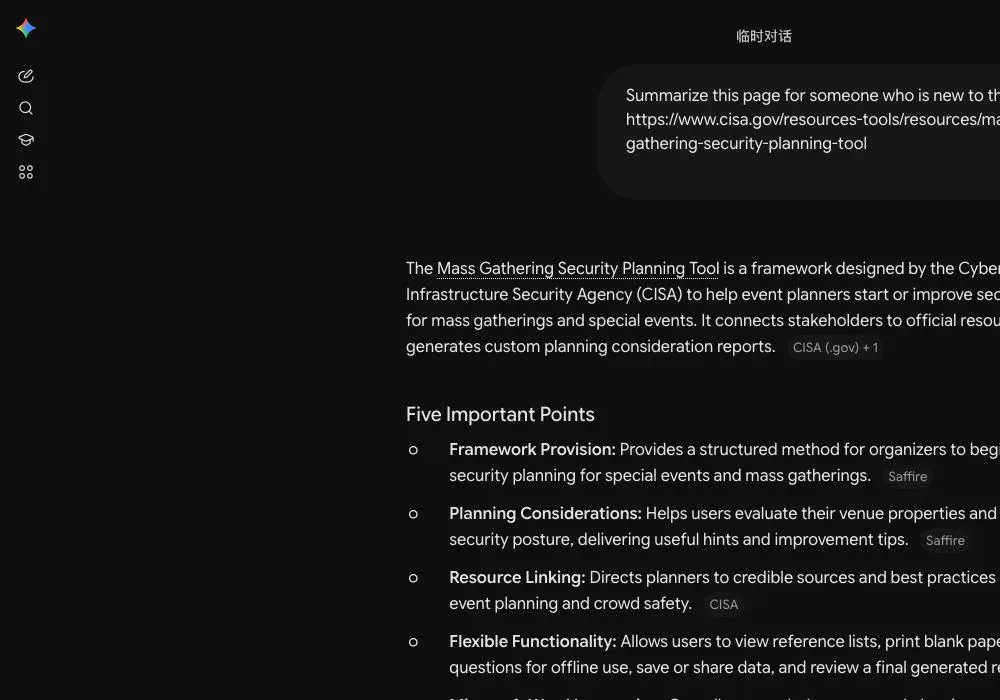
On October 13, 2026, H5W used a logged-in Gemini temporary chat to summarize CISA's public Mass Gathering Security Planning Tool page. Gemini found the main purpose, named CISA and the Department of Homeland Security, included the page's May 24, 2024 revision date, and returned five useful points with source links.
The weak spot was the limits section. It described the tool as guidance rather than a safety guarantee, which is sensible, but some extra technical details came from linked material rather than the short CISA page itself. That is why the source links still matter: open them before using a date, warning, or operational claim.
Keep the source open
AI is useful for getting the shape of a long webpage quickly. It is not a replacement for the page when one word, date, or exception changes your decision. Keep the original open beside the summary and check the details you plan to use.
Sources and verification
Information last verified: October 13, 2026.
- OpenAI: What is ChatGPT? FAQ
- OpenAI: Search and deep research in ChatGPT
- OpenAI: Data controls in ChatGPT
Official facts and the real logged-in Gemini workflow were checked on October 13, 2026. The screenshot shows the tested interface, not a generated mockup.
Free printable resource
AI PDF Summary Worksheet
Use the practical version while you work. It is a selectable-text U.S. Letter PDF with no email gate.
Public H5W PDF with selectable text and permanent source links.
Keep going
Choose your next step
Return to Summarize for the full collection, or continue with a closely related guide.