
How to Create a Study Guide From Your Notes With AI
Your notes contain the important ideas, but they may be repetitive, incomplete, or written in a hurry. AI can organize them into something easier to review. The danger is that it may also fill the gaps with facts that were never in your class material.
Give AI the notes, tell it to use only those notes, and require [CHECK] beside anything incomplete or unsupported. Ask for an overview, key terms, practice questions, and a separate list of gaps to confirm with your teacher or course materials.
Start with a clean source
Use the smallest set of material that covers the topic:
- your own typed notes;
- a permitted class handout;
- selected slides or reading pages;
- the test topics or learning objectives supplied by the instructor.
Remove names, student numbers, grades, private feedback, and anything you do not have permission to upload.
If handwritten notes were scanned as images, check that the text is readable. A missed minus sign, date, formula, or heading can change the study guide.
Copy this prompt
Create a beginner-friendly study guide from the notes below.
Use only the notes. Do not add outside facts, definitions, examples, or exam claims.
Include:
1. a short plain-English overview;
2. key terms with definitions supported by the notes;
3. a process or concept outline;
4. eight practice questions with answers;
5. a “check your notes” section for anything incomplete or uncertain;
6. a three-day review plan.
Label every statement that is not fully supported
[CHECK]. For every answer, point to the bullet or section of the notes that supports it.NOTES:
[paste your notes]
The phrase “use only the notes” is important. Without it, the AI may mix your course material with general knowledge and make it difficult to see what you were actually taught.
What happened in H5W's test
H5W tested this prompt in a logged-in ChatGPT Temporary Chat on October 11, 2026. We used fictional biology notes about photosynthesis. The notes contained confirmed inputs, outputs, and locations, plus an unconfirmed ATP/NADPH question and three deliberately missing areas.
ChatGPT kept the confirmed material separate from the gaps. It marked “limiting factor” [CHECK] because the term appeared in the exam note but was not defined. It also flagged the ATP/NADPH connection, the balanced equation, how glucose is used, and the missing explanation of how three factors affect the rate.
That is the behavior you want: missing information remained visible instead of becoming a smooth but unsupported explanation.
The output was not perfect. It created interactive “show answer” questions even though a simple answer-under-each-question layout would be easier to copy or print. An earlier run also inherited the account's language context and added an extra recap; the publication recheck stayed in English after the prompt stated that requirement. A cleaner follow-up would be:
Rewrite the guide in plain American English only. Put every practice answer directly below its question. Remove extra recaps and keep all
[CHECK]labels.
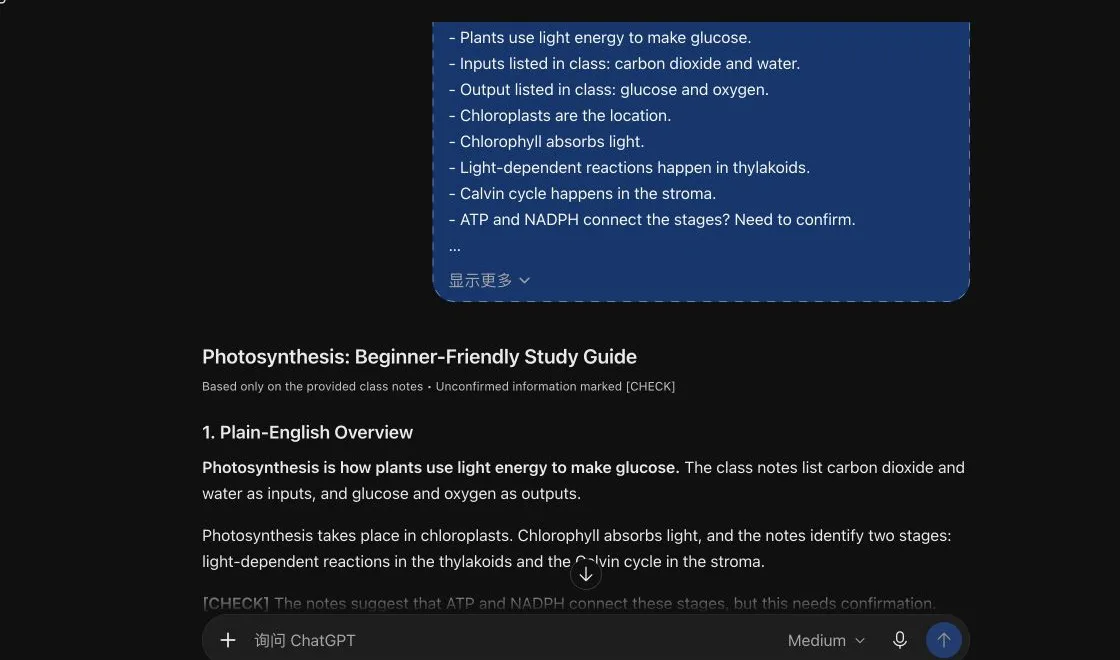
AI can make the guide easier to use. You still decide which format helps you learn.
Use Study Mode for active practice
ChatGPT Study Mode can work through material step by step, quiz you, and respond to your answers. OpenAI says it is available across ChatGPT plans, but it must be used in a regular chat; it is not available in Temporary Chats, GPTs, or Projects.
After the guide is accurate, try:
Quiz me one question at a time using only this checked study guide. Wait for my answer. If I am wrong, point to the relevant section before explaining it.
Do not start with the quiz. First make sure the source and guide are correct.
When NotebookLM may be the easier option
Gemini Notebook can answer from the sources you add and show citations back to those sources. That makes it useful when you want to jump from an answer to the supporting passage.
Source citations help you check the answer. They do not guarantee the source itself is correct or complete.
For practice questions inside Google's study-notebook workflow, continue with How to Create Quizzes With Gemini Study Notebooks.
Check these five things
1. Are missing topics still visible?
If the notes do not explain a term, the guide should say so. Do not memorize a guessed definition.
2. Did the AI change a formula, date, or name?
Compare important details character by character with the source.
3. Are the practice answers supported?
Ask for the exact note or section behind every answer. Remove questions that require material you have not covered.
4. Did it invent what will be on the exam?
Only the instructor, syllabus, or official assessment guide can establish that.
5. Does the guide help you retrieve information?
Rereading a summary feels productive, but answering questions from memory is more useful. Hide the answers and try first.
Practical tips
- Make one guide per topic instead of one enormous guide for the entire course.
- Add page numbers or section labels before uploading notes.
- Ask for a “what is missing?” list before requesting explanations.
- Keep
[CHECK]items in a separate box until you confirm them. - After checking the guide, ask AI to vary the question order and difficulty.
If your source is a long document rather than class notes, start with How to Summarize a PDF With AI.
Privacy and school rules
Follow your school's rules for AI use. Do not upload a restricted exam, another student's work, private instructor comments, or copyrighted material you are not allowed to share.
Temporary Chat is not used to improve OpenAI's models while it remains temporary and does not appear in history, but OpenAI says it may retain a copy for up to 30 days for safety. Study Mode requires a regular chat, so its conversation follows your account and workspace settings.
The bottom line
The best AI study guide is not the longest one. It is the one that keeps source facts, missing information, and practice questions clearly separated. Tell the AI to stay inside your notes, keep [CHECK] visible, and verify the guide before you study from it.
Sources and verification
Information last verified: October 11, 2026.
- OpenAI: Using Study Mode in ChatGPT
- OpenAI: Uploading files and audio to ChatGPT
- Google: Use chat in Gemini Notebook
- OpenAI: Temporary Chat
Hands-on test completed October 11, 2026, using fictional class notes with deliberate gaps and no private student information.
Free printable resource
AI Study Guide Builder
Use the practical version while you work. It is a selectable-text U.S. Letter PDF with no email gate.
Public H5W PDF with selectable text and permanent source links.
Keep going
Choose your next step
Return to Research & Learn for the full collection, or continue with a closely related guide.