How to Turn a Voice Memo Into a To-Do List With AI
You recorded a quick voice memo because your thoughts were moving faster than your fingers. Now it contains a deadline, a phone call, something another person must confirm, and two ideas with no date at all.
Separate tasks from everything else: get a transcript, ask AI to separate tasks from waiting items and questions, and require [CHECK] anywhere the owner, date, or priority was not actually stated. Then listen to the important parts of the memo again before adding anything to your calendar.
The fastest way to do it
- Get the memo into text. Upload the audio when your tool supports it, or copy a transcript from your phone.
- Remove private details you do not need.
- Paste the prompt below with the transcript.
- Check names, dates, amounts, and dependencies against the recording.
- Move only the verified tasks into your real task app or calendar.
Do not ask for “a better plan” first. That encourages the AI to make priority decisions that were never in the recording.
Copy this prompt
Turn this voice-memo transcript into a practical to-do list.
Use only information stated in the transcript. Group items as:
– Do now
– Schedule
– Waiting for someone else
– Questions to clarify
For every item, show the task, owner, due date, and the exact phrase that supports it. Write
[CHECK]when an owner, date, or priority is missing. Do not invent deadlines or decide that something is urgent unless the transcript says so.TRANSCRIPT:
[paste the transcript]
If your memo uses words such as “tomorrow” or “next Monday,” add the recording date above the transcript. Otherwise, the task list may preserve a relative date that becomes confusing later.
What happened in H5W's test
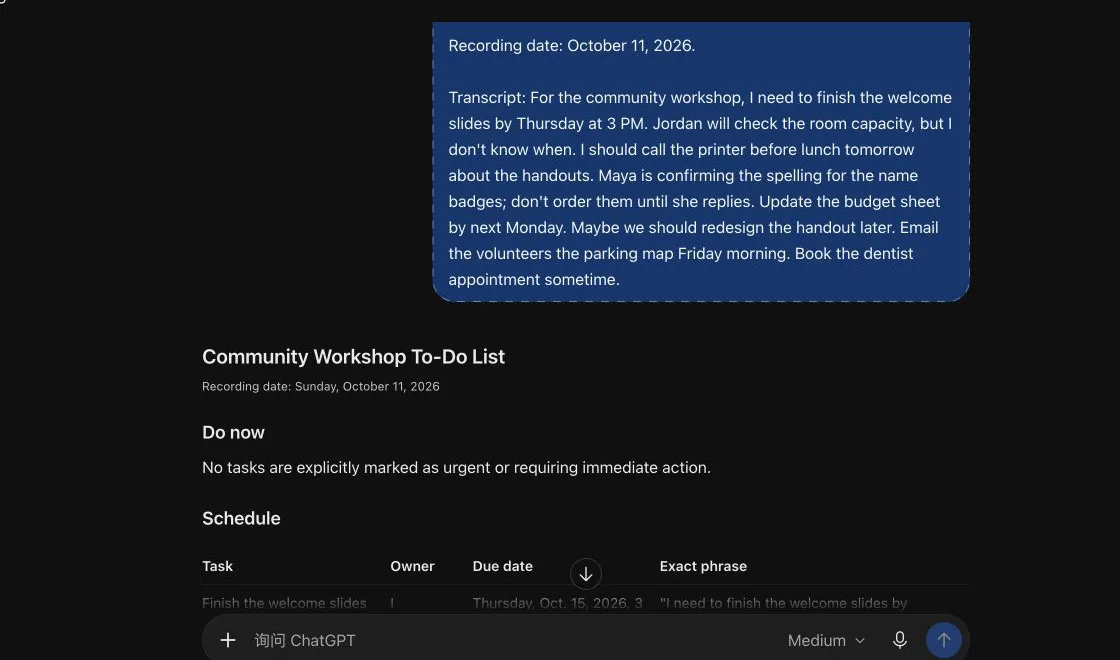
H5W tested the organizing step in a logged-in ChatGPT Temporary Chat on October 11, 2026. We used a fictional transcript with eight tasks: some had clear owners and deadlines, two depended on another person, and several were missing a date.
The useful part worked. ChatGPT kept “Thursday at 3 PM,” “before lunch tomorrow,” “Friday morning,” and “next Monday.” It assigned the room-capacity check to Jordan, marked the missing date [CHECK], and kept the name-badge order behind Maya's spelling confirmation.
The result was not perfectly consistent across runs. In the first test it placed the budget sheet under Do now even though the memo only said it was due next Monday. In the publication recheck, it correctly left Do now empty and moved the budget sheet to Schedule. That difference is a useful warning: a polished layout does not guarantee the model interpreted priority the same way twice.
The safe follow-up was:
Review your list again. Do not place a task under “Do now” unless the transcript explicitly says it is urgent or must happen today. Move every unsupported priority to “Schedule” and mark it
[CHECK].
That extra check matters more than making the first answer look polished.
If you have an audio file instead of a transcript
ChatGPT currently accepts supported audio files on paid subscriptions and workspaces. Free accounts can upload documents and spreadsheets, but OpenAI's current help page says audio uploads are not available on the Free plan. Availability can also depend on the selected model, workspace, region, and app version.
You have three practical routes:
- Upload the audio: useful when your account supports it. Ask for a transcript first, correct it, then request the task list.
- Use ChatGPT Record: currently limited to eligible paid workspaces in the macOS desktop app. It can transcribe voice notes, but you should still check the transcript.
- Paste a phone transcript: often the simplest option. Correct names and dates before asking AI to organize it.
Do not combine transcription and planning in one step when the memo contains an important deadline. A wrong transcript can become a confident-looking wrong task.
Check these four things
1. Did the transcript hear the name correctly?
Names, product terms, street names, and acronyms are easy to mishear. Compare them with the recording.
2. Was a thought turned into a task?
“Maybe we should redesign the handout” is not the same as “Redesign the handout by Friday.” Keep ideas separate from commitments.
3. Did AI invent urgency?
An early deadline is not automatically the most important task. Ask the AI to show the words that support every priority.
4. Is a dependency visible?
“Order badges after Maya confirms the spelling” should not become two unrelated tasks. The order is blocked until the confirmation arrives.
Useful small improvements
- Ask for tasks in a table when you need to scan owners and dates.
- Ask for a second list containing only missing information.
- Add the memo's recording date and time before the transcript.
- Use labels such as
[ME],[CLIENT], and[COWORKER]instead of real names. - When the list is correct, ask for an import-ready format for your own task app. Check it before importing.
For a larger set of tasks, continue with How to Turn Messy Notes Into a Weekly Plan With AI.
Privacy and recording safety
A private memo can contain customer names, health information, passwords spoken aloud, business plans, or details about another person. Remove anything the AI does not need.
If the recording includes other people, make sure you had permission to record them and that the recording follows the rules where you live and work. OpenAI also warns that transcripts and speaker identification can contain errors.
Temporary Chat is useful for fictional or lower-sensitivity tests because it stays out of chat history and is not used to improve OpenAI's models while it remains temporary. OpenAI says a copy may still be kept for up to 30 days for safety. It is not permission to upload confidential information.
For meetings with several speakers, use How to Turn a Meeting Recording Into Notes With ChatGPT.
The bottom line
AI is good at turning a rambling transcript into a readable list. It is not reliable enough to decide what you meant, what is urgent, or whether a relative date was transcribed correctly. Require evidence for every owner and deadline, keep missing details visible, and verify the important items against the recording.
Sources and verification
Information last verified: October 11, 2026.
- OpenAI: Uploading files and audio to ChatGPT
- OpenAI: ChatGPT Record
- OpenAI: Temporary Chat
- OpenAI: Data Controls
Hands-on test completed October 11, 2026, using a fictional transcript with no private information. The test covered the transcript-to-task step, not speech-recognition accuracy.
Keep going
Choose your next step
Return to Organize & Plan for the full collection, or continue with a closely related guide.