
How to Create a Meeting Agenda With AI
The meeting is tomorrow, the calendar invite is already out, and nobody has written the agenda. AI can turn a few rough notes into a useful plan—but only if you tell it what the meeting must decide.
Give AI the meeting goal, the people or roles attending, the available time, and the known topics. Ask it to assign minutes and an owner to each item, then check that the time adds up before you send it.
The five-minute version
- Write one sentence beginning with:
By the end of this meeting, we need to… - Add the meeting length, attendees, known topics, and any pre-work.
- Paste the prompt below into ChatGPT, Gemini, Claude, or another conversational AI tool.
- Remove invented details and combine any items that do not need live discussion.
- Send the agenda early enough for people to prepare.
If you cannot name a decision, action, or shared understanding the meeting should produce, consider replacing the meeting with an email.
Copy this prompt
Create a practical meeting agenda using only the facts I provide.

Meeting: [MEETING NAME]
Date and length: [DATE AND TOTAL MINUTES]
People or roles attending: [ATTENDEES]
What we need to accomplish: [DESIRED RESULT OR DECISION]
Known topics: [TOPICS]
Pre-work or documents: [PRE-WORK, OR NONE]

Return:
1. A one-sentence purpose.
2. The desired decision or finished result.
3. A timed agenda whose items add up to exactly [TOTAL MINUTES].
4. One owner or discussion lead for each item, using only the roles I listed.
5. Any pre-work participants should complete.
6. A final five-minute section for decisions, owners, and next steps.
7. A verification note listing anything missing, uncertain, or assumed.

Do not invent names, facts, deadlines, decisions, or background. If information is missing, label it [NEEDS INPUT] instead of guessing.
Replace these fields
[MEETING NAME]: a plain label, such as “Website launch check-in.”[DATE AND TOTAL MINUTES]: the real date and duration.[ATTENDEES]: names only when appropriate; roles are often enough.[DESIRED RESULT OR DECISION]: what should be different when the meeting ends.[TOPICS]: your rough list, even if it is untidy.[PRE-WORK, OR NONE]: a document to read, a number to bring, ornone.[TOTAL MINUTES]: the same duration stated above.
What happened in H5W's test
H5W tested this prompt in a logged-in Gemini session on October 17, 2026. The fictional meeting was a 30-minute bakery website launch check-in. The goal was to decide whether a menu page was ready for Friday; the known issues were a mobile-spacing decision and three missing product photos.
Gemini kept the purpose and desired decision separate, assigned the owner, designer, and developer to relevant sections, and produced four time blocks totaling exactly 30 minutes. It also flagged that individual names and any deadlines beyond Friday had not been supplied.
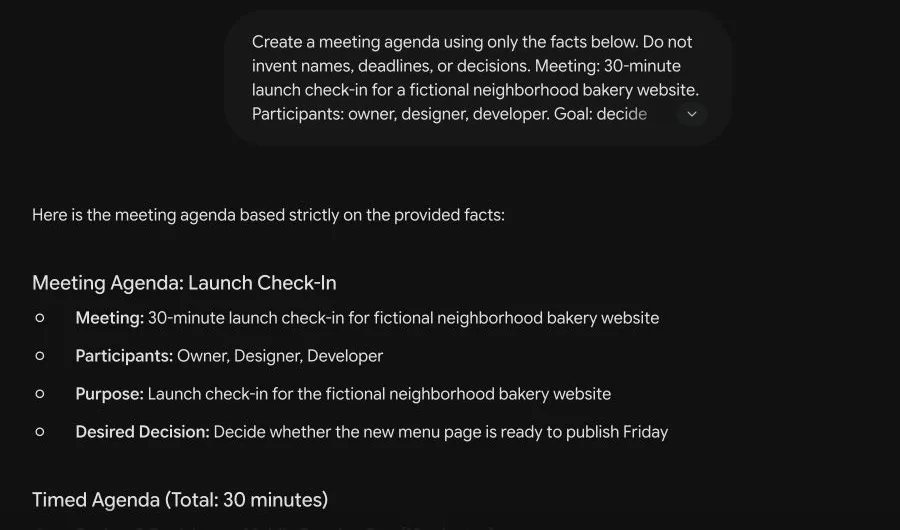
The first result still needed editing: the purpose repeated some wording from the meeting name, and a real organizer would need to confirm who can make the final launch decision. AI gave us a workable draft, not permission to skip that check.
A simple 30-minute agenda shape
| Time | Item | What should happen |
|---|---|---|
| 0-5 minutes | Context and goal | Confirm the question the group must answer |
| 5-20 minutes | Main discussion | Review the evidence and resolve the biggest issue |
| 20-25 minutes | Secondary items | Cover only items that still need the group |
| 25-30 minutes | Decisions and owners | Record decisions, owners, and due dates |
Do not force every meeting into this pattern. A one-on-one, interview, workshop, or emergency call needs a different shape. The useful part is that every block has a purpose.
Three checks before you send it
Does the time add up?
AI occasionally creates a “30-minute agenda” containing 35 minutes of activities. Add the numbers yourself and leave a small buffer if the topic is sensitive or uncertain.
Is every discussion item necessary?
Status updates people can read beforehand do not need ten minutes of airtime. Put them in pre-work and reserve the meeting for questions, decisions, and coordination.
Is the decision-maker present?
An agenda cannot fix a meeting attended by everyone except the person who can approve the work. Confirm who owns the final decision.
Useful tips
- Put the desired result near the top of the calendar invitation.
- Share links to pre-reading instead of pasting confidential documents into an AI tool.
- Use roles rather than names when personal details are unnecessary.
- For a difficult conversation, add time for questions rather than packing every minute.
- End by reading back decisions, owners, and dates. Do not rely on everyone remembering the same thing.
Safety note
Do not paste private employee matters, customer data, unreleased financial information, access links, or confidential legal discussions into an unapproved AI service. Replace sensitive facts with neutral labels, or use an organization-approved account with the correct data controls.
After the meeting, turn the record into clear meeting notes, then use those notes to write the follow-up email and assign next steps.
Sources and verification
Information last verified: October 17, 2026.
- Microsoft: Get started with the Microsoft Teams calendar
- Microsoft: Take meeting notes in Microsoft Teams
- Microsoft: Facilitator in Microsoft Teams meetings
Hands-on test completed October 17, 2026, with fictional business details. No real workplace information was uploaded.
Free printable resource
Practical AI Planning Workbook
Use the practical version while you work. It is a selectable-text U.S. Letter PDF with no email gate.
Public H5W PDF with selectable text and permanent source links.
Keep going
Choose your next step
Return to Work for the full collection, or continue with a closely related guide.