
How to Create a Simple Event Plan With AI
You have a date, a rough idea, and several people asking what they should bring. What you need is a usable checklist—not a 30-page event strategy.
Tell the AI the event type, date, guest count, budget ceiling, venue limits, and must-have activities. Ask for decisions first, then a dated checklist, supply list, responsibilities, and day-of schedule. Verify prices, availability, accessibility, safety, and local rules yourself.
This method fits a small party, workshop, club meeting, open house, or community gathering. A large public event needs experienced planners, venue staff, local authorities, and appropriate safety professionals.
Decide the fixed points first
Before asking for a plan, write down:
- event type and purpose;
- date, start time, and end time;
- expected number of guests;
- budget ceiling;
- venue and its restrictions;
- food, accessibility, or age considerations;
- what must happen for the event to count as successful.
If a detail is unknown, label it TO DECIDE. Do not let the AI quietly choose a venue, budget, or policy for you.
Start with one prompt, then split it if needed
Help me plan a small [event type] for [number] people on [date] from [time] to [time].
Budget ceiling: [amount]
Venue and known limits: [details]
Must-have activities or outcomes: [list]
Food, accessibility, age, or transport considerations: [details without guest names]
First list the decisions I still need to make. Then create:
1. a dated checklist working backward from the event;
2. a simple budget with
VERIFY PRICEbeside every estimate;3. a supply list grouped by who provides each item;
4. a 30-minute day-of schedule;
5. a backup plan for weather, late vendors, and low attendance.
Do not invent permits, venue rules, prices, availability, or safety approval. Mark anything that needs confirmation as
CHECK.
Review the decisions before asking for the rest. Otherwise, the tool may build a neat plan around an assumption you never agreed to.
If the answer stops halfway or the tool returns an error, ask for only the CHECK decisions and dated checklist first. Then request the budget, supplies, schedule, and backup plans in a second message.
Turn the answer into owners and dates
“Arrange chairs” is not a finished task. Change it to:
Task: Confirm chair count with venue
Owner: Jordan
Due: October 20
Proof: Written confirmation from venue
Every important task needs an owner and a due date. Add a proof field for bookings, payments, permissions, deliveries, and accessibility requests.
If the list feels too large, use How to Turn a Goal Into an Action Plan With AI to separate the next action from later work.
Check the details AI cannot confirm
Generated event plans often include plausible but unverified details. Confirm these directly:
- venue capacity, opening hours, access times, and cleanup rules;
- current vendor prices, deposits, cancellation terms, and availability;
- permits, insurance, alcohol, food-service, noise, and local requirements;
- accessible entrances, restrooms, seating, parking, communication, and evacuation routes;
- emergency contacts, first aid, weather plans, and who can stop the event if conditions are unsafe.
CISA describes its own mass-gathering planning tool as a starting framework rather than a complete safety plan. A general AI checklist should be treated even more cautiously.
For a small private gathering, not every mass-event control will apply. The point is to ask the venue and responsible professionals, not to let AI declare the event safe.
Keep the guest list somewhere else
The AI usually needs a count and broad needs, not guest names, addresses, phone numbers, dietary or medical details tied to individuals, door codes, ticket records, or payment information.
Write “two guests need step-free access” rather than naming them. Keep invitations and private responses in the service you already use for guest management. Check What Information Should You Never Share With AI? before pasting a registration list.
Make the day-of schedule boring
A useful run sheet is simple. Include:
- who opens the venue;
- vendor arrival windows;
- setup order;
- sound or equipment check;
- doors open;
- activity start and finish;
- food service;
- announcements;
- cleanup and final venue check.
Add buffer time. If the tool fills every minute, ask it to remove nonessential activities and protect setup, transitions, and cleanup.
For a busy preparation week, How to Turn Messy Notes Into a Weekly Plan With AI can help turn updates into a realistic schedule.
What happened in H5W's real test
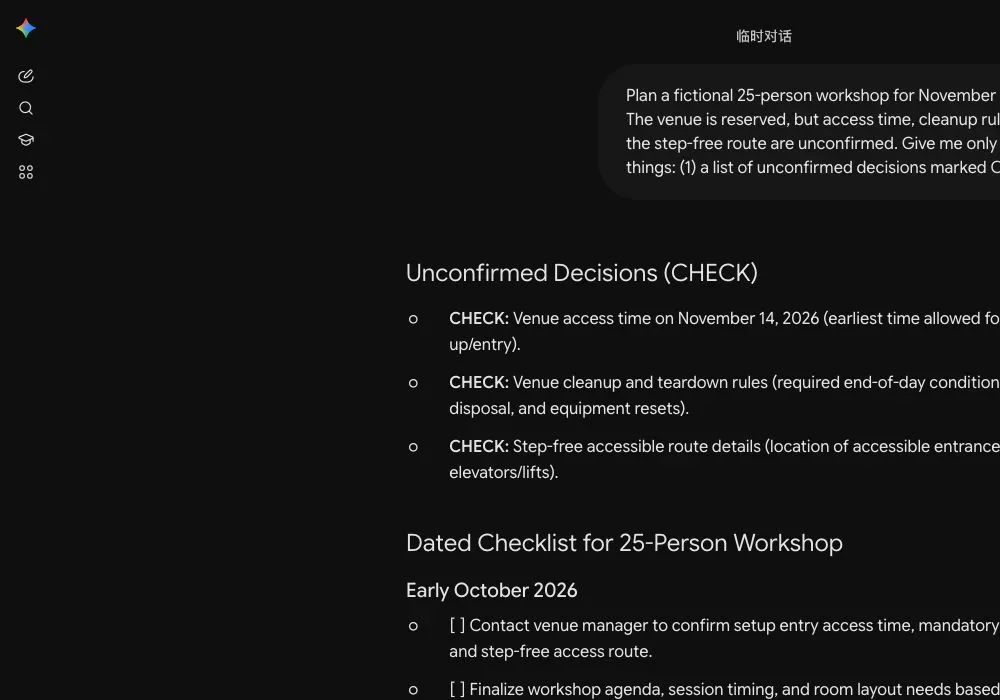
On October 13, 2026, H5W tested a fictional 25-person workshop in a logged-in Gemini temporary chat. The long all-in-one request failed or stopped before finishing more than once. A shorter first request worked: Gemini marked the access time, cleanup rules, and step-free route as CHECK, then produced a dated checklist without pretending those details were confirmed.
The practical fix was to work in layers. Ask for decisions and dates first. After checking them, ask separately for the budget, supply owners, schedule, and backup plans. This is easier to review and less likely to leave you with a polished but incomplete plan.
Let AI organize; let real people confirm
AI is good at turning scattered details into a checklist. It cannot reserve the room, confirm the price, inspect the entrance, approve food handling, or take responsibility during an emergency. Use the plan to know what to check and who needs to confirm it.
Sources and verification
Information last verified: October 13, 2026.
- CISA: Mass Gathering Security Planning Tool
- ADA.gov: Americans with Disabilities Act Title II regulations
- OpenAI: What is ChatGPT? FAQ
- OpenAI: Data controls in ChatGPT
Official facts and the real logged-in Gemini workflow were checked on October 13, 2026. The screenshot shows the tested interface, not a generated mockup.
Free printable resource
Practical AI Planning Workbook
Use the practical version while you work. It is a selectable-text U.S. Letter PDF with no email gate.
Public H5W PDF with selectable text and permanent source links.
Keep going
Choose your next step
Return to Organize & Plan for the full collection, or continue with a closely related guide.