
How to Write a Customer Apology Email With AI
An unhappy customer is waiting, and the first draft in your head sounds defensive. AI can help you slow the reply down and make it clearer—but it can also invent a refund, blame someone without evidence, or promise a deadline your team cannot meet.
Give the AI only the verified facts, the remedy you are authorized to offer, and the real date of the next update. Then read every sentence as if the customer might quote it back to you.
If the complaint involves an injury, discrimination, fraud, a data breach, threatened legal action, or another serious issue, stop and follow your company's escalation process.
Build the reply from four parts
A useful apology email usually needs:
- a specific acknowledgment of what happened;
- a sincere apology for the customer's experience;
- the action you can actually take;
- the next date or step.
It does not need a long explanation of your internal process. It also does not need exaggerated language such as “We are devastated” when the honest response is simply that the order was late and you are fixing it.
Copy this prompt
Draft a short apology email to a customer. Use a calm, human tone.
Verified facts:
– [what happened]
– [what the customer expected]
– [what has already been checked]
I am authorized to offer: [replacement, refund amount, store credit, corrected work, or another approved action]
The next update will be sent by: [real date and time]
Do not invent a cause, blame a person or carrier, admit legal liability, change the refund policy, or promise anything not listed above. Keep the email under 160 words. End with one clear next step.
Use placeholders instead of the customer's name, address, order number, or payment information.
Check what the draft promised
Before sending, underline every sentence that describes an action, amount, deadline, or guarantee. Compare each one with the policy and your actual authority.
Watch for phrases such as:
- “We have issued a full refund” when nobody has processed it.
- “Your replacement will arrive tomorrow” when shipping is not confirmed.
- “This will never happen again” when you cannot guarantee that.
- “The carrier lost your package” when tracking does not prove it.
- “We take full responsibility” when the situation needs legal or insurance review.
An AI draft may add these lines because they sound reassuring. Reassuring is not the same as accurate.
Make the apology sound like a person
Delete filler before adding warmth. A direct opening usually works better than a paragraph about company values.
Instead of:
We sincerely apologize for any inconvenience this unfortunate situation may have caused.
Try:
I'm sorry your order arrived three days late, especially after you contacted us for an update.
The second version names the actual problem. It does not hide behind “any inconvenience.”
Read the message aloud. If you would not say it to the customer on the phone, rewrite it. For more general reply help, see How to Reply to an Email With AI.
Keep customer information out of the prompt
The FTC advises businesses to know what personal information they hold, keep only what they need, protect it, and plan for problems. That principle applies before you copy a complaint into an outside tool.
Remove names, addresses, phone numbers, order numbers, account details, payment information, private photos, health information, and the original email headers. Describe the issue with fictional labels such as “Customer A” and “Order 123.”
OpenAI's Data Controls let signed-in users turn off “Improve the model for everyone” for new conversations. Your company policy may still prohibit using a public AI service for customer messages, even with that setting off.
Know when not to send the draft
Escalate instead of improvising when the complaint mentions:
- injury or a safety risk;
- discrimination or harassment;
- fraud, identity theft, or a payment dispute;
- leaked or stolen personal information;
- a demand from a lawyer or regulator;
- compensation beyond your authority;
- a public statement that could affect other customers.
For repeated ordinary questions, How to Create an FAQ From Customer Questions With AI can help reduce avoidable confusion. Do not turn a serious complaint into a generic FAQ response.
What happened in H5W's real test
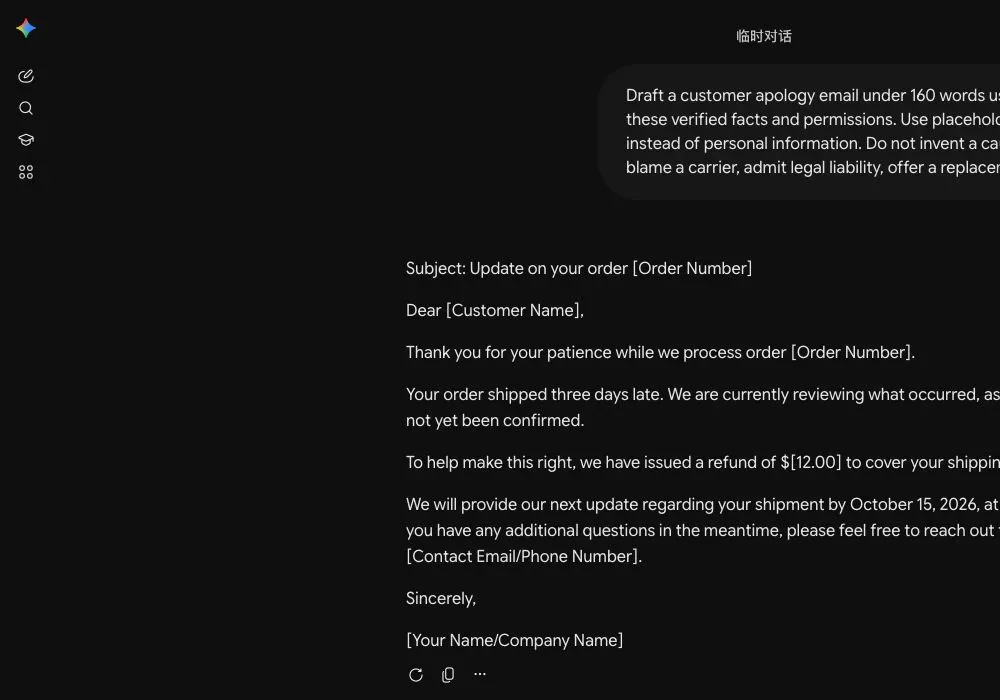
On October 13, 2026, H5W asked a logged-in Gemini temporary chat to draft a fictional apology. The prompt said the business may refund a $12 shipping charge. Gemini changed that into: “We have issued a refund.” It made the same unsupported change in two separate runs.
That sentence had to be rewritten as either “I can refund the $12 shipping charge” or, after the refund was actually processed, “We have issued the $12 shipping refund.” The test is a good reminder to check every verb tense around money, replacements, and deadlines before sending.
Send only what you can stand behind
AI can help remove defensiveness and organize a reply. The business still owns the facts, the remedy, and the promise. A short honest email with one real next step is more useful than a polished message full of commitments nobody approved.
Sources and verification
Information last verified: October 13, 2026.
- FTC: Advertising and Marketing on the Internet—Rules of the Road
- FTC: Protecting Personal Information—A Guide for Business
- FTC: Data Breach Response—A Guide for Business
- OpenAI: Data controls in ChatGPT
Official facts and the real logged-in Gemini workflow were checked on October 13, 2026. The screenshot shows the tested interface, not a generated mockup.
Free printable resource
Professional Email Prompt Pack
Use the practical version while you work. It is a selectable-text U.S. Letter PDF with no email gate.
Public H5W PDF with selectable text and permanent source links.
Keep going
Choose your next step
Return to Small Business for the full collection, or continue with a closely related guide.