How to Create a Home Inventory With AI
You do not need to catalog every fork before your home inventory becomes useful. Start with one room, photograph the important items, and let AI turn your rough notes into a clean table.
Use AI to organize facts you can see—not to estimate what your belongings are worth. Keep the photos and receipts as evidence, check every model and serial number yourself, and store a copy of the finished inventory somewhere outside your home.
Start with one shelf, not the whole house
Set a 20-minute timer and choose one area with items that would be difficult or expensive to replace: your desk, entertainment center, kitchen appliances, or tools.
For each item, capture what you can:
- item name and quantity;
- room or location;
- brand and model;
- serial number, if relevant;
- purchase year and price, if known;
- a wide photo plus a close photo of the label;
- receipt, appraisal, or warranty location.
If a detail is unreadable or missing, write unknown. That is better than a confident guess.
Copy this prompt
Create a home inventory table using only the notes I provide.

Room or area: [ROOM]
My notes: [PASTE YOUR NOTES]

Use these columns:
- item ID
- room
- item
- quantity
- brand/model
- serial number
- purchase year
- purchase price
- photo/receipt note
- needs review

Rules:
- Do not estimate prices or fill missing details.
- Write "unknown" when I did not provide a value.
- Preserve uncertain characters exactly, such as 8F?2, and flag them for review.
- Combine matching items only when my notes clearly say they are a set; keep the correct quantity.
- Do not calculate a total value unless every included price came from my notes.

After the table:
1. List every field I still need to check.
2. Give me a five-step plan for naming and storing the matching photos and receipts.
3. Confirm that you did not invent any price, date, model, or serial number.
Replace these fields
[ROOM]: one room or small area, such asliving room.[PASTE YOUR NOTES]: a simple list you typed while walking around the room.
You can paste the table into Google Sheets or Excel after checking it. Use one row per item or matching set.
What happened in H5W's test
H5W tested the prompt in Gemini on October 17, 2026, using a fictional living-room note. It included a TV with a partly readable serial number, two matching lamps, a console with a $399 receipt, and several unknown purchase details.
Gemini created five inventory rows, correctly kept the two lamps on one row with quantity 2, preserved the uncertain serial as 8F?2, and did not make up prices or purchase years. It also listed the missing fields for a second pass.
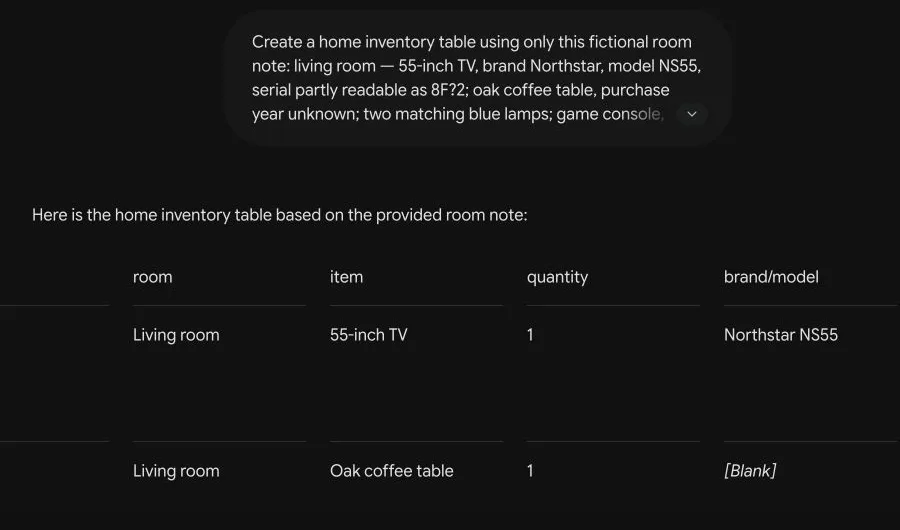
The result still needed human checking. A table cannot prove that a model or serial number was copied correctly, and AI cannot know whether an old receipt belongs to the item in the photo.
Take photos that will still make sense later
For an important item, take at least two pictures:
- A normal photo showing the item and where it is in the room.
- A close photo of the model and serial label, if it has one.
Add a room overview video if that is easier, but do not let the video replace the written list. A searchable table helps you find an item quickly, while photos support what you recorded.
Use simple filenames such as living-room-tv-01.jpg and put that filename in the inventory row. Keep receipts and appraisals in a matching folder.
What not to upload
A home inventory can reveal more than you intend. Before using a general AI service, remove or cover:
- your street address and insurance policy number;
- keys, access cards, alarm panels, and security camera positions;
- passports, licenses, tax documents, and mail;
- Wi-Fi labels, passwords, QR codes, and recovery keys;
- photos of children or other people who do not need to be included;
- serial numbers when the tool does not need to read them.
The safer method is often to type neutral notes into AI, then add the sensitive evidence to your private spreadsheet or encrypted storage afterward.
Check the finished inventory
Before you call it done:
- compare every high-value row with the original item and receipt;
- confirm quantities, especially for sets;
- mark estimated replacement values separately from purchase prices;
- get appraisals for valuables when your insurer asks for them;
- store a backup outside your home or in a secure cloud account;
- update the list after major purchases, moves, or renovations.
Ready.gov recommends documenting property before a disaster and keeping records in a safe place. The Insurance Information Institute also recommends recording identifying details and supporting the list with photos, video, receipts, and appraisals where appropriate.
If you are preparing for a change of address, use the inventory while you plan your move with AI. Before uploading room photos, check whether it is safe to upload photos to ChatGPT.
Sources and verification
Information last verified: October 17, 2026.
- Ready.gov: Document and Insure Your Property
- Insurance Information Institute: How to create a home inventory
- Insurance Information Institute: Three reasons to take a home inventory
Hands-on test completed October 17, 2026, using fictional property details. No address, policy, receipt image, or real serial number was uploaded.
Free printable resource
Practical AI Planning Workbook
Use the practical version while you work. It is a selectable-text U.S. Letter PDF with no email gate.
Public H5W PDF with selectable text and permanent source links.
Keep going
Choose your next step
Return to Organize & Plan for the full collection, or continue with a closely related guide.