
How to Make a Family Schedule With AI
Soccer pickup is at 5:00. One adult is still at work, the other has an appointment, and the calendar says only “soccer.” A full calendar can still leave nobody responsible for getting a child home.
Give AI a short list of fixed events, each person's availability, and the travel time you already know. Ask for one weekly table with a named owner for each pickup and task. Have it flag clashes and missing details, then check the draft together before adding it to your family calendar.
Start with next week. Use labels such as Adult A and Child B, and leave out names, schools, addresses, phone numbers and private appointment details. A chatbot does not need those to spot a timing problem.
Gather the details that actually affect the week
You can paste a plain text list into ChatGPT or another general chat tool. You do not need to connect your inbox or calendar for this method.
Separate fixed commitments from things you can move. Include school or work hours, activities, appointments, who is available for transport, and known preparation or travel time. For each event, write the day, start, end and person involved. If you do not know a detail, write “unknown.”
| Detail | Useful input |
|---|---|
| Fixed event | Tuesday, Child A activity, 4:00–5:00 PM |
| Responsibility | Adult B handles drop-off; pickup not assigned |
| Availability | Adult A works until 5:30 PM |
| Travel | Allow 20 minutes each way |
| Flexible task | Laundry, 30 minutes, owner undecided |
Include meals, rest and empty time where they matter. Do not fill every gap just because it is visible.
Copy this prompt
Make a draft family schedule using only the details below.
Week: [WEEK]
People (use anonymous labels): [PEOPLE]
Fixed commitments with day, start and end times: [FIXED EVENTS]
Each person's availability and transport responsibilities: [AVAILABILITY]
Known travel and preparation time: [TRAVEL AND PREP]
Flexible chores or activities: [FLEXIBLE TASKS]

Keep every fixed commitment unchanged. Do not invent times,
travel durations, availability or assigned owners.
Mark missing information [CHECK]. Put impossible overlaps in
a conflict list; do not silently move an event or assume another
adult can cover it. Suggest options separately for us to approve.

Return:
1. A weekly table: day, time, person, event/task, responsible
adult, travel/prep and status.
2. Conflicts and questions we must resolve.
3. A verification summary listing fixed events preserved,
missing details and any suggested changes needing approval.
Leave unallocated time empty. Do not connect to any account,
send invitations or change a calendar.
Replace these fields: [WEEK] is the date range; [PEOPLE] is your anonymous household list. Put confirmed commitments in [FIXED EVENTS], working hours and agreed responsibilities in [AVAILABILITY], known buffers in [TRAVEL AND PREP], and movable jobs in [FLEXIBLE TASKS]. Use “unknown” wherever you still need to ask someone.
Check the week dates against an actual calendar. If you use “Monday” without dates, keep that convention throughout the first draft rather than letting the tool choose a date for you.
Fix the conflicts before sharing the plan
Read the conflict list first. A tidy table can hide an impossible handoff.
- Can the responsible adult finish work and arrive in time, including travel?
- Does a pickup overlap another child's drop-off?
- Is an end time, return trip or supervision arrangement missing?
- Has the AI assigned somebody who never agreed to do the job?
- Are repeating events still happening this particular week?
Ask the people involved to confirm the unresolved rows. Then tell AI the agreed change and ask it to update only those rows. Keep the original fixed commitments visible while you compare the two versions.
A suggested solution such as “Adult A leaves work early” needs that person's approval. Treat it as a question until confirmed.
What happened in our test
H5W ran this prompt in logged-in Gemini on November 2, 2026, using two fictional adults and two fictional children. Tuesday's activity ended at 5:00 PM, but Adult A worked until 5:30 and Adult B had an appointment until 5:30. Wednesday's club had no end time, and the laundry had no owner.
Gemini caught the impossible Tuesday pickup, kept the Wednesday end time as [CHECK], and left laundry unallocated. It preserved the supplied event times.
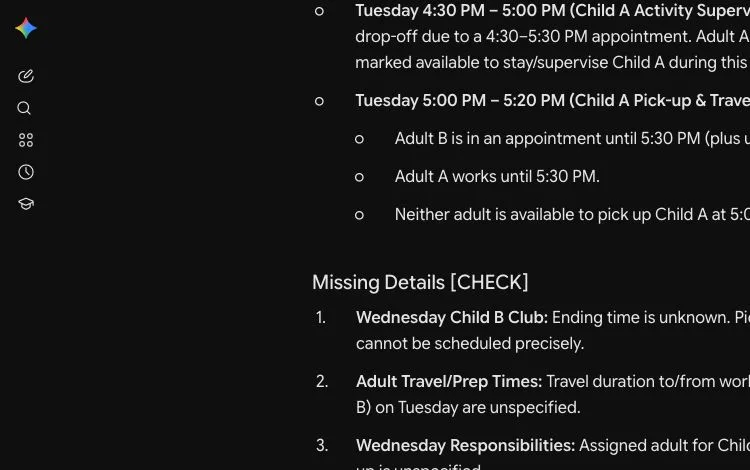
It also raised a supervision conflict even though the prompt never said an adult had to stay at the activity. That was a question to check, not an established problem. Its suggestion that Adult A finish work at 4:40 also needed a route-specific travel check: the supplied 20 minutes did not establish every possible journey. Even a helpful result needs a person to check its assumptions.
Put the checked version somewhere everyone uses
Copy the agreed rows into your existing shared calendar, spreadsheet or printed planner. Keep one current version and choose a simple way to announce changes. A phone calendar is useful only if the people who need it can actually see it.
If you use Google Calendar, check its sharing permissions before sharing a family calendar. Give access only to the people who need it; a public calendar can expose your household's movements. Add personal locations privately after the planning step.
Keep a short weekly check-in: confirm the next seven days, assign unresolved pickups and remove canceled events. Review changed rows again when someone updates a time.
Free access and privacy
For this plain text workflow, start with a chat tool you already use. ChatGPT's current Free Tier FAQ says everyday text chats are unlimited, subject to safeguards; uploads and other tools have separate limits. A short pasted list avoids needing file uploads or a calendar integration. Use your own account if prompted to sign in. This workflow needs no paid subscription or payment card, and you can copy the table manually without an export feature.
ChatGPT's Temporary Chat stays out of chat history and is not used to improve models while it remains temporary. That does not make a detailed children's schedule suitable to upload. Keep school names, routes, health details and custody information out of the chat.
AI can organize the information you supply. It cannot confirm whether a coach changed practice or another adult accepted a pickup. Check those details with the person or original notice.
Next steps
For the rest of your own week, use the messy-notes-to-weekly-plan guide. For dinners and shopping, make a separate meal plan and grocery list. Find more everyday planning tasks in Organize & Plan.
Information last verified: November 2, 2026. Product information checked against the official sources linked above.
Keep going
Choose your next step
Return to Organize & Plan for the full collection, or continue with a closely related guide.