
How to Turn Messy Notes Into a Weekly Plan With AI
Your notes contain work tasks, errands, reminders, and half-finished ideas. Some have deadlines. Others are just things you hope to do. Looking at the whole list makes the week feel worse, not clearer.
Give AI your real tasks, deadlines, fixed appointments, available work time, and top priorities. Ask for a plan with daily focus blocks, small-task space, and a buffer. Require it to label every assumption instead of inventing dates or urgency.
Give the AI facts, not a perfect list
Copy your notes and add only the information you know:
- hard deadlines;
- fixed appointments or classes;
- rough time needed for larger tasks;
- tasks that depend on someone else;
- your normal available hours;
- the two or three results that matter most this week.
Use placeholders for private names and projects. The AI does not need a client's identity to schedule “review client draft.”
Do not spend half an hour cleaning the notes. Let AI sort the rough bullets.
Copy this prompt
Turn my notes into a realistic plan for [Monday through Friday / the next seven days].
First, separate the items into:
– fixed commitments;
– urgent tasks with real deadlines;
– important tasks without a deadline;
– small tasks under 20 minutes;
– items that need more information.
Then create a daily plan. Use no more than two main focus tasks per day, group small tasks together, and leave at least 20 percent of my available time unplanned for delays.
Do not invent deadlines, durations, or priorities. Mark missing information with [CHECK]. If the work does not fit, tell me what should move instead of squeezing everything in.
My available time: [days and hours]
My top results for the week: [two or three outcomes]
Fixed commitments: [appointments, classes, or meetings]
Messy notes: [paste list]
This prompt lets the AI say the week is overloaded instead of assuming you can work every evening.
What happened in H5W's test
H5W tested the prompt in a logged-in ChatGPT temporary chat on October 10, 2026. The fictional week had 29 available hours, 13 task notes, three fixed commitments, a proposal deadline, a presentation deadline, and a supplier answer that had to arrive before Friday's order.
The result preserved the fixed times and Thursday travel, scheduled the proposal and presentation before their deadlines, flagged the supplier dependency, and used [CHECK] for missing timing. It also claimed 6 hours 10 minutes of buffer, or 21.3 percent.
But its capacity summary contained a real arithmetic error: it showed the fixed commitments as 4 hours even though its own table listed a one-hour meeting, a 90-minute class, and a two-hour appointment-and-travel block—a total of 4.5 hours.
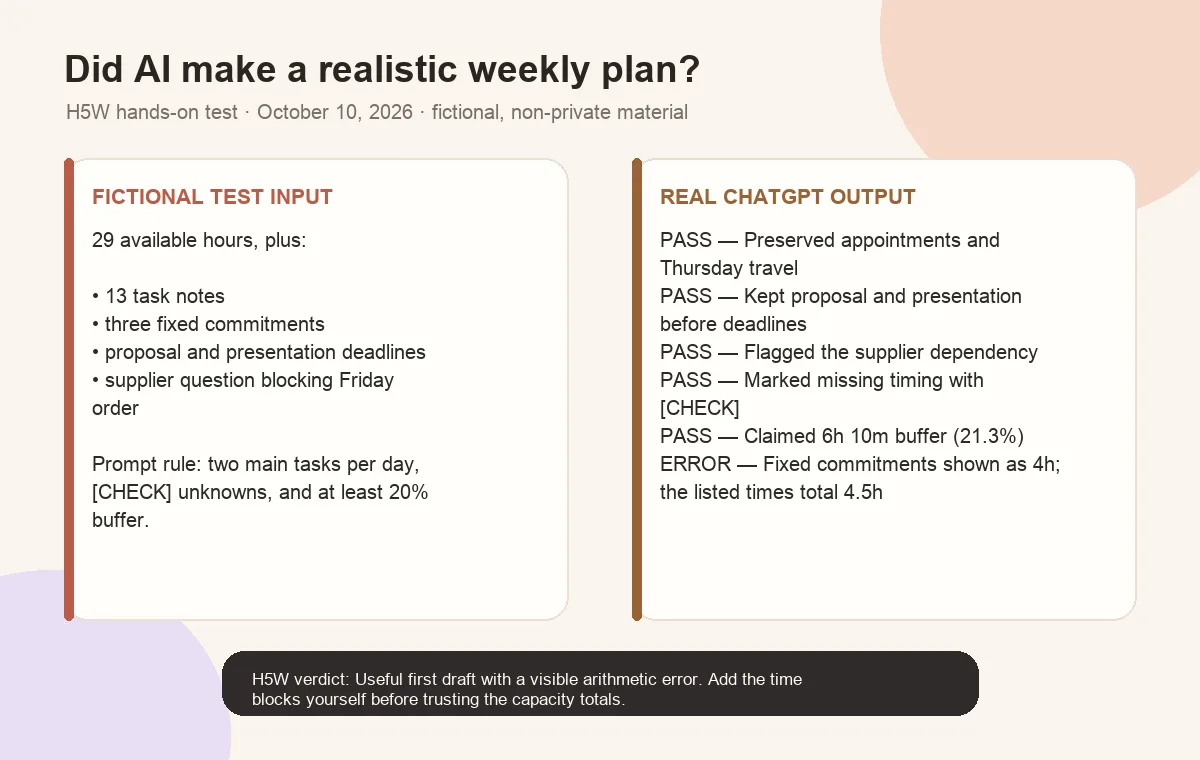
That is the practical lesson: a neat schedule can still contain bad math. Add the time blocks yourself, check that every fixed commitment is included, and recalculate the buffer before treating the plan as realistic.
Fix the plan in three minutes
Move work that needs someone else's answer
If a task depends on approval, information, or a delivery, schedule the request first and keep the work in a waiting list.
Check travel and setup time
AI does not know your travel or setup time. Add it yourself.
Protect one buffer block
Keep the buffer for late work, a new urgent task, or something you forgot.
Use a smaller plan when the week is already full
If the first answer feels impossible, do not ask AI to “optimize it more.” Ask for a minimum viable week:
Rebuild the plan with only fixed commitments, tasks due this week, and the two results I said matter most. Move everything else to a later list. Show me the consequence of each item you postpone.
This forces a real tradeoff and makes delays easier to explain.
Do not let the plan create fake certainty
A weekly plan is a suggestion, not a prediction. Watch for:
- made-up deadlines or priorities;
- every task receiving the same importance;
- large projects being treated as one short item;
- meetings placed without preparation or travel time;
- work assigned to hours you never said were available;
- no time for breaks, interruptions, or unfinished work.
Do the final check yourself. The tool cannot know your energy or which commitments are negotiable.
Keep private details out of the notes
Replace customer names, medical appointments, student information, internal project names, financial details, and personal conflicts with neutral labels.
For example, use “private appointment,” “client review,” or “school meeting.” The plan only needs the time and task, not the personal story.
If the list belongs to your workplace, use an approved tool. H5W's guide to information you should never share with AI explains what to remove.
The bottom line
AI is useful here because it can sort a messy list and show where the week does not fit. Give it real constraints, require visible assumptions, and keep some time empty. A plan that admits what must move is better than a perfect-looking schedule you cannot follow.
You can use the prompt in ChatGPT or Claude; the method matters more than the brand.
Sources and verification
Information last verified: October 10, 2026.
- Microsoft: Get started writing prompts in Microsoft Copilot
- Microsoft: Copilot in Planner FAQ
- OpenAI: Data controls in ChatGPT
- Google: Gemini Apps Privacy Hub
Hands-on test completed October 10, 2026, using fictional, non-private planning notes.
Free printable resource
Practical AI Planning Workbook
Use the practical version while you work. It is a selectable-text U.S. Letter PDF with no email gate.
Public H5W PDF with selectable text and permanent source links.
Keep going
Choose your next step
Return to Organize & Plan for the full collection, or continue with a closely related guide.