
What to Do If You Shared Personal Information With ChatGPT
You pasted something into ChatGPT, pressed Send, and only then noticed the password, account number, private file, or client name.
Do not spend the next ten minutes searching settings while the exposed information is still usable. Secure the password, payment method, identity document, or work account first. Then delete the ChatGPT conversation and separately check Library files, Memory, shared links, and connected apps.
Deleting the chat is useful cleanup. It does not undo a bank transfer, revoke a password, recall a link someone opened, or guarantee that every retained copy disappears immediately.
Do this first
| What you shared | First action |
|---|---|
| Password, login code, recovery code, API key, or access token | Change or revoke it now at the service it unlocks. Sign out other sessions if that option exists. |
| Card, bank, or payment information | Contact the bank or payment provider using the number on the card or its official website. Lock or replace the affected card if advised. |
| Social Security number, passport, driver's license, or other identity document | Use the relevant government or issuer's identity-theft process. In the United States, start with IdentityTheft.gov. |
| Confidential work, school, customer, or client information | Follow the organization's incident-reporting process. Tell the responsible person instead of quietly deleting the chat and hoping. |
| Someone else's private information | Tell the person or organization responsible for it when disclosure could cause harm. Do not copy it into another AI tool for a second opinion. |
| A private photo or file | Delete the chat, then check Library, shared links, projects, connected storage, and the original cloud-sharing permissions. |
If more than one row applies, start with the action that prevents immediate harm. A live password or bank card matters before tidying up the chat history.
Clean up ChatGPT in the right places
1. Delete the conversation—do not archive it
Open the chat's options menu and choose Delete. Archiving only removes the conversation from the regular sidebar; it remains saved under the normal retention rules.
OpenAI currently says a deleted chat disappears from your account view immediately and is scheduled for permanent deletion from its systems within 30 days, unless it has already been de-identified or must be kept for security or legal reasons.
That is why deletion is not the first response to a stolen password. Change the password first.
2. Check Library for uploaded files
OpenAI says files uploaded to or created in ChatGPT may be saved in Library. Deleting the conversation does not necessarily delete a separately saved Library file.
Open Library, find the uploaded photo or document, and delete it there too. If Recently deleted is available, review that area and permanently remove the file when appropriate.
If the file came from connected Google Drive storage, manage the original file and its sharing permissions in Google Drive as well.
3. Review Memory
Deleting a chat and clearing a remembered detail are separate actions.
Go to Settings > Personalization > Memory and review the controls available to your account. Remove any saved personal detail that came from the conversation. Turning Memory off does not delete old chats, and deleting one chat does not automatically remove every separately saved memory.
4. Remove shared links
If you used ChatGPT's Share button, anyone who can open a personal-account shared link may be able to view the shared content and forward the link.
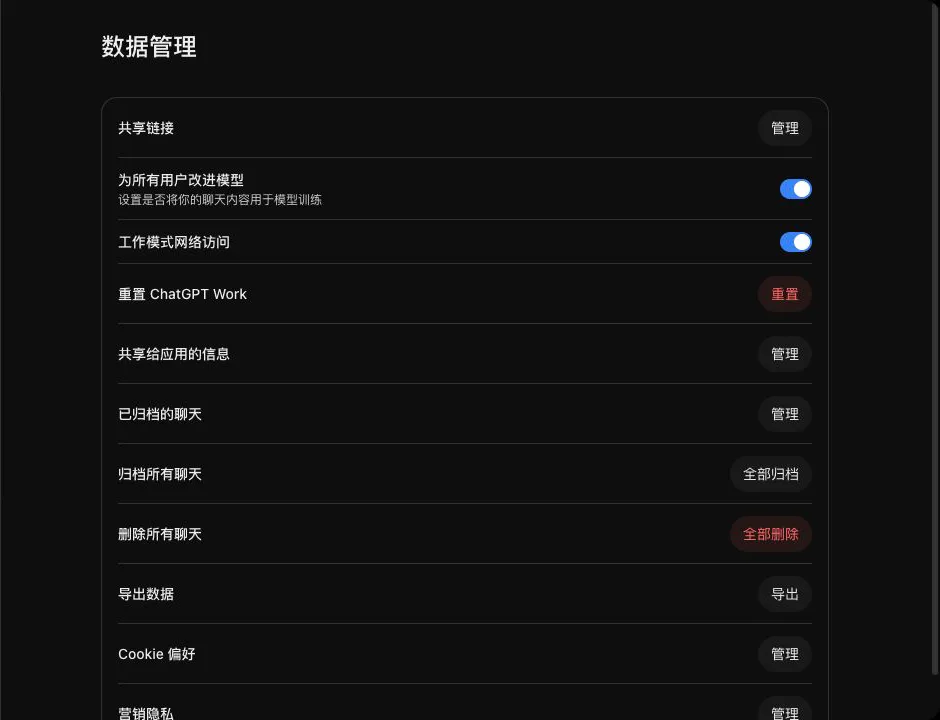
Go to Settings > Data controls > Shared links > Manage and delete the relevant link. Deleting a shared link stops future access through that link, but it cannot remove a copy another person already saved.
5. Check connected apps and outside links
If the conversation used Gmail, Google Drive, another connected app, or a generated link, review that service too. Disconnecting an app can stop future access, but it does not automatically delete past conversations that used its information.
Remove unnecessary permissions and check whether the original file, email, or folder was shared outside its intended audience.
Do not paste the secret again
A common panic response is to open another chatbot and ask:
I accidentally shared this password:
[REAL PASSWORD]. What should I do?
Do not repeat the exposure. Describe the type of information instead:
I shared a real password with an AI chatbot. I have not reused it anywhere else. Give me a cleanup checklist without asking me to paste it.
The tool does not need the actual secret to explain the next step.
What turning off training changes
In a personal ChatGPT account, Settings > Data controls > Improve the model for everyone controls whether new conversations may be used to improve OpenAI's models.
Turning it off is a sensible privacy choice, but it does not revoke an exposed password, delete old chats, remove Library files, clear Memory, or cancel a shared link. Those actions must be handled separately.
Temporary Chat can reduce what is saved for future conversations, but it is not a safe place for secrets. OpenAI says temporary chats are not used for model training and may still be retained for up to 30 days for safety.
What H5W checked in a real account
H5W opened Settings > Data controls in a signed-in ChatGPT account on October 13, 2026. The page included controls for shared links, model improvement, archived chats, and deleting chats. We did not change the account or enter personal information. The account area was removed from the screenshot.
After the immediate problem is contained
- Check recent sign-ins, transactions, and account-recovery changes.
- Enable multi-factor authentication after changing an exposed password.
- Watch for follow-up messages from people claiming they can “recover” or erase the information for a fee.
- Keep a short record of what was shared, when it happened, and which protective actions you took.
- If the information belonged to work, school, a client, or another person, follow their process even when no misuse is visible yet.
For the next upload, use What Information Should You Never Share With AI? and make a clean copy with How to Remove Personal Information Before Uploading a File.
First secure the information, then clean up ChatGPT
Act on the exposed information first and ChatGPT second.
Change or revoke credentials, contact the bank or responsible organization, and use official identity-theft help where appropriate. Then delete the conversation and check the separate places where the content may still exist: Library, Memory, shared links, projects, and connected services.
Sources and verification
Information last verified: October 13, 2026. ChatGPT controls and retention behavior can change and must be checked again before publication.
- OpenAI: Deleting and archiving chats in ChatGPT
- OpenAI: Using Library to manage files in ChatGPT
- OpenAI: Memory in ChatGPT
- OpenAI: Sharing conversations and scheduled tasks in ChatGPT
- OpenAI: Data Controls FAQ
- FTC: What To Do if You Were Scammed
- IdentityTheft.gov
Free printable resource
AI Scam Pause-and-Verify Checklist
Use the practical version while you work. It is a selectable-text U.S. Letter PDF with no email gate.
Public H5W PDF with selectable text and permanent source links.
Keep going
Choose your next step
Return to Safety & Privacy for the full collection, or continue with a closely related guide.