
What Information Should You Never Share With AI?
You want help rewriting an email, checking a resume, or summarizing a document. Copy, paste, done—except the text includes names, account details, or information that belongs to your employer.
Keep these details out of consumer AI tools: do not give a consumer AI tool passwords or security codes, identity numbers, financial details, private medical or legal records, confidential work or client information, or another person's personal details. Remove them, replace them with placeholders, or describe the situation without identifying anyone.
If the task cannot be done without the sensitive information, stop and use an approved work, school, medical, or legal system instead.
Never paste these into a consumer AI tool
1. Passwords and security codes
Never share passwords, PINs, one-time login codes, reset links, recovery codes, security answers, cryptocurrency seed phrases, API keys, or access tokens.
An AI assistant does not need a real secret to explain how a login works or help you troubleshoot an error. Replace it with [PASSWORD], [CODE], or a made-up example.
If you already pasted a real password or access key, change or revoke it immediately. Deleting the conversation is not enough.
2. Identity documents and official numbers
Do not share Social Security or national identity numbers, passport or driver's license numbers, tax or patient numbers, birth certificates, signatures, biometric records, or photos of identity cards.
Even ordinary details can identify someone when combined. A full name, date of birth, home address, employer, and phone number may be far more revealing together than each detail looks on its own.
3. Bank, card, tax, and payment information
Keep out bank and routing numbers, complete card details, payment links tied to real accounts, tax returns, payroll records, and invoices that expose customer or payment details.
If you want help understanding a fee or comparing two options, type only the numbers needed for the calculation. Remove the account holder, account number, address, barcode, and transaction reference.
4. Private medical, legal, school, or HR records
A personal AI account is not the place for a patient's chart, a child's school record, an employee complaint, an unredacted legal document, or a private counseling note. Ask with a general description instead:
Explain this term in plain English:
[TERM].
For an important health, legal, financial, or employment decision, use AI only for general preparation and check the answer with a qualified person.
5. Confidential work, customer, or client information
Do not paste internal plans, unreleased results, contracts, source code, customer lists, meeting notes, pricing, credentials, or anything marked confidential into a personal AI account.
The information may belong to your employer or client. Turning off model training does not change a confidentiality agreement. Use an approved workplace system only for information the policy permits; when unclear, ask first.
6. Someone else's personal information
Do not share a coworker's resume, a customer's complaint, a student's work, a private message, someone's photo, or a conversation recording just because you can access it. Remove identifying details and get permission when the person could still be recognized.
Use placeholders instead
You usually do not need the real details to get a useful answer.
Instead of this:
Rewrite this email to Maria Jensen at Brightwell Dental about invoice 48219 for $7,430. Her mobile number is 555-0198.
Use this:
Rewrite this email to
[CLIENT NAME]about an overdue invoice. Keep the tone polite and direct. Ask when payment will be made. Do not add facts.
The AI can still improve the email. You can put the correct name and amount back into the final draft yourself.
Useful placeholders include:
[NAME][COMPANY][CITY][ACCOUNT NUMBER][AMOUNT][DATE][PRIVATE DETAIL REMOVED]
Check these four things before you send
Ask yourself:
- Do I own this information? If it belongs to an employer, customer, school, patient, or another person, permission may be required.
- Does the AI need this detail? Send one paragraph instead of a whole file when one paragraph is enough.
- Can I replace it? Use placeholders, ranges, invented examples, or a short description.
- Would a leak cause harm? If exposure could affect someone's money, identity, health, safety, job, or reputation, do not put it into a consumer AI service.
When in doubt, leave it out.
Privacy settings help—but they are not permission
Privacy controls are useful, but they solve only part of the problem.
OpenAI says consumer content may be used to improve models depending on settings. Temporary Chat stays out of history and model improvement while temporary, but a copy may be retained for up to 30 days for safety. Google says Gemini Apps process prompts and shared content, including files, photos, and screens. Anthropic says consumer Claude content is not used to train its generative models unless the user reports or opts in to it, or a conversation is flagged for safety review.
These differences do not make any consumer tool an appropriate place for secrets or information you are not allowed to share.
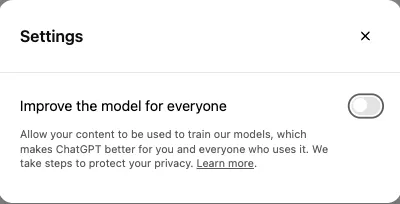
The safest habit is simple: remove sensitive information before it reaches any AI tool.
If you already shared something sensitive
Act based on what was exposed:
- change a password or PIN;
- revoke an API key, token, recovery code, or shared link;
- contact the bank or card provider if payment details were exposed;
- tell your employer, school, or client through the proper incident-reporting process;
- delete the conversation and any separately saved file, project, or activity;
- monitor the affected account for unusual activity.
Deleting a chat may not remove every copy immediately. OpenAI, for example, says a deleted saved chat is normally scheduled for permanent deletion within 30 days, subject to stated exceptions. Prevention is safer than cleanup.
The short version
Give AI the task, not the identity behind the task.
Use placeholders, share only the smallest useful excerpt, and keep passwords, official numbers, private records, confidential work, and other people's information out of consumer AI tools.
For files, use H5W's document-upload safety checklist before sending anything. If you are working on a job application, make a private copy first and follow the safety steps in How to Improve Your Resume With AI.
If a request for sensitive information arrived by email, use the AI phishing email checklist before you reply, click, or paste anything into a tool.
Sources and verification
Information last verified: October 8, 2026.
- NIST: Guide to Protecting the Confidentiality of Personally Identifiable Information
- OpenAI: How OpenAI Handles Data in Consumer Services
- OpenAI: Chat and File Retention in ChatGPT
- Google: Gemini Apps Privacy Hub
- Anthropic: Is My Data Used for Model Training?
Free printable resource
AI File Upload Safety Checklist
Use the practical version while you work. It is a selectable-text U.S. Letter PDF with no email gate.
Public H5W PDF with selectable text and permanent source links.
Keep going
Choose your next step
Return to Safety & Privacy for the full collection, or continue with a closely related guide.