
How to Make a Meal Plan and Grocery List With AI
You want a few realistic dinners and one shopping list, not 20 complicated recipes that ignore what is already in the kitchen.
Give the plan real household limits: tell AI how many people you are feeding, what food you already have, your time and budget limits, and anything you avoid. Ask it to plan leftovers once and organize the shopping list by store section. Then check quantities, labels, food safety, and current prices yourself.
If someone has a food allergy or medical diet, AI is only an organizing tool. It cannot tell you that a product is safe.
The fastest way to do it
- List food in the refrigerator, freezer, and pantry that should be used first.
- Add the number of people, days, cooking-time limit, and rough budget.
- State preferences and foods to avoid.
- Ask for meals first, then one combined grocery list.
- Check labels, quantities, leftovers, and prices before shopping.
Copy this prompt
Make a [number]-dinner meal plan and one grocery list for [number] people.
Use food already at home first. Keep each weeknight meal under [time]. Plan leftovers once so food is not wasted. Organize the final grocery list by store section.
My budget target is [amount], but do not claim current store prices unless I provide them.
Foods already at home:
[list]
Preferences and foods to avoid:
[list]
Mark
[CHECK LABEL]beside every packaged item when an allergy is involved. Do not give medical advice or promise that any product is allergen-safe.
For a medical diet, use requirements provided by a qualified professional instead of asking AI to create them.
What happened in H5W's real test
H5W tested the workflow in a logged-in Gemini Temporary Chat on October 12, 2026. The fictional household had two adults, a peanut allergy, a 30-minute cooking limit, a rough $75 target, and several pantry items.
Gemini produced five dinners, used the listed pantry ingredients, planned leftovers, kept the flavors mild, and organized a grocery list by department. It marked packaged items such as soy sauce, sausage, cheese, tortillas, and seasoning with [CHECK LABEL]. It did not claim current store prices.
The result still needed a practical check. Its overview said Night 1 used one cup of rice, while the detailed recipe told the reader to cook two cups. It also supplied exact quantities and under-30-minute estimates that H5W did not cook or time.
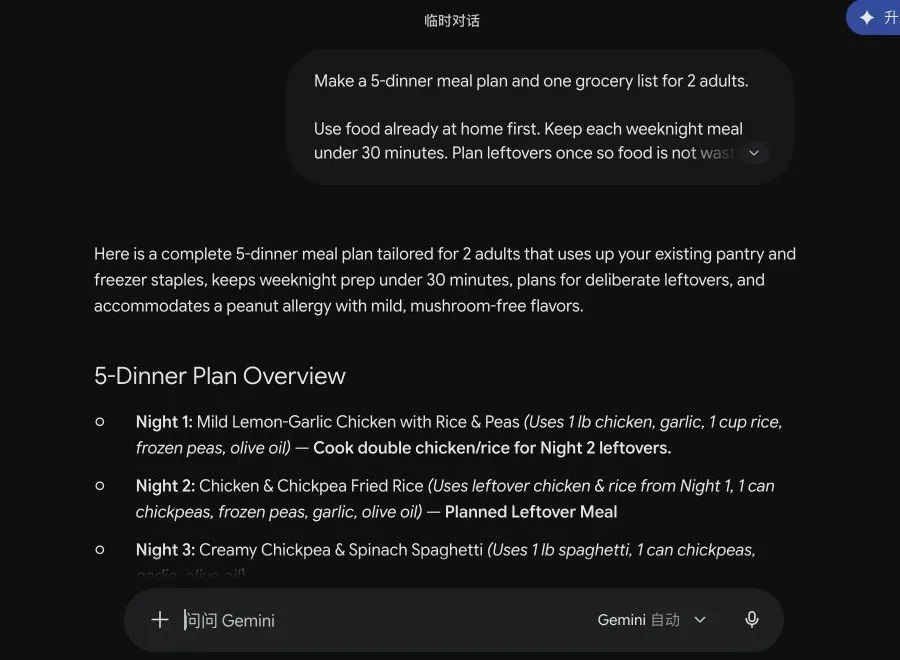
Useful lesson: check that the overview, ingredient quantities, shopping list, and instructions agree. A polished plan is not the same as a tested recipe.
Check these five things before shopping
1. Does every meal use the same ingredients it names?
If the title says butter but the method says olive oil, choose one and correct the list.
2. Are the quantities realistic?
AI may undercount servings or forget that one ingredient is used twice. Add up repeated ingredients across the week.
3. Are leftovers planned safely?
Decide when leftovers will be cooled, stored, and eaten. Follow current USDA food-safety guidance, not an invented AI timeline.
4. Are allergy labels checked?
The FDA advises people with food allergies to read labels and avoid the foods they are allergic to. Ingredients and manufacturing warnings can change, so check the package every time.
5. Does the plan fit the real budget?
AI does not know today's price at your store unless it uses a current, reliable source. Compare the list with your store or shopping app and swap expensive items yourself.
For a purchase decision, see How to Compare Products With AI Before You Buy.
Practical tips that make the plan more useful
- Ask for dinners only before adding breakfasts and lunches.
- Name the two busiest nights so those meals are easiest.
- Ask the AI to use fresh food earlier in the week.
- Tell it which leftovers your household will actually eat.
- Keep one flexible meal for schedule changes.
- Ask for substitutions, but verify allergens and quantities yourself.
- Save a corrected pantry list for next week instead of starting from zero.
USDA MyPlate recommends checking what you already have, planning meals around your time, using leftovers, and organizing the grocery list by store section. Those simple steps matter more than making the menu look clever.
Privacy and health boundaries
You usually do not need to share a diagnosis, medication, exact body measurements, or a child's private health information to get a basic grocery plan. State only the food restriction needed for the task.
Do not use a general AI answer to manage a severe allergy, eating disorder, pregnancy diet, infant feeding, kidney disease, diabetes, or another medical need. Use an appropriate clinician or trusted official source.
For general planning habits, continue with How to Turn a Goal Into an Action Plan With AI.
The bottom line
AI can organize pantry items, preferences, leftovers, and a shopping list quickly. It cannot guarantee an allergen-safe product, an accurate store price, or a tested recipe. Use it for the draft; use labels, official safety guidance, and your own check for the final plan.
Sources and verification
Information last verified: October 12, 2026.
- USDA MyPlate: Make a Plan
- FDA: Food Allergies
- USDA FSIS: Leftovers and Food Safety
- Google: Gemini Apps Privacy Hub
Hands-on test completed October 12, 2026, in Gemini Temporary Chat using fictional household and pantry details. The generated meals were reviewed for prompt compliance, not cooked or medically evaluated.
If dinner plans depend on pickups, activities and work shifts, build a checked family schedule first so the meal plan fits the time you actually have.
Free printable resource
Practical AI Planning Workbook
Use the practical version while you work. It is a selectable-text U.S. Letter PDF with no email gate.
Public H5W PDF with selectable text and permanent source links.
Keep going
Choose your next step
Return to Organize & Plan for the full collection, or continue with a closely related guide.